---
title: "Clocr Digital Estate Planning Alternatives: How to Compare Your Options"
description: Explore the best Clocr digital estate planning alternatives. Compare digital vaults and tools to protect family records and ensure easy access when needed.
image: https://getautoseo.com/storage/hero_images/clocr-digital-estate-planning-alternatives-how-to-compare-your-options.jpg?v=410767b1fdf1
---
[Skip to content](https://www.ironcladfamily.com/blog/clocr-digital-estate-planning-alternatives-how-to-compare-your-options#main-content)
[](https://www.ironcladfamily.com/)
- [WHY DIGITAL VAULTS](https://www.ironcladfamily.com/blog/tag/digital-family-vaults-estate-planning)
- [FINANCIAL PLANNING](https://www.ironcladfamily.com/blog/tag/financial-planning)
- [END OF LIFE PLAN](https://www.ironcladfamily.com/blog/tag/end-of-life-planning)
- [PREPAREDNESS](https://www.ironcladfamily.com/blog/tag/emergency-planning)
- [FOR ADVISORS](https://www.ironcladfamily.com/blog/tag/advisors)

# Clocr Digital Estate Planning Alternatives: How to Compare Your Options

[Michael Lester September 26, 2026](https://www.ironcladfamily.com/blog/author/michael-lester)
- 12 mins
The most feature-rich estate planning tool may not be the one that helps your family most. If loved ones can’t find your records or understand how to access them, a detailed plan may still leave important questions unanswered. When comparing Clocr digital estate planning alternatives, start with the continuity your family needs, not a long feature list.
It’s reasonable to want one service to cover everything, but estate planning platforms, document vaults, legacy services, and password managers solve different problems. Their names alone won’t tell you how they handle privacy, family access, or important documents.
This guide offers practical questions for comparing options: What can you organize? How can chosen people access information when needed? What does the provider explain about privacy and access controls? You’ll also find ways to identify which tool categories may fit your needs and check provider claims before relying on them.
1. Why Look for Clocr Digital Estate Planning Alternatives?
2. How Digital Estate Planning Alternatives Differ
3. Common Mistakes When Comparing Clocr Alternatives
4. A Practical Checklist for Choosing a Clocr Alternative
5. When a Digital Vault May Be the Right Clocr Alternative
6. Give Your Family a Clearer Path Forward
7. Frequently Asked Questions
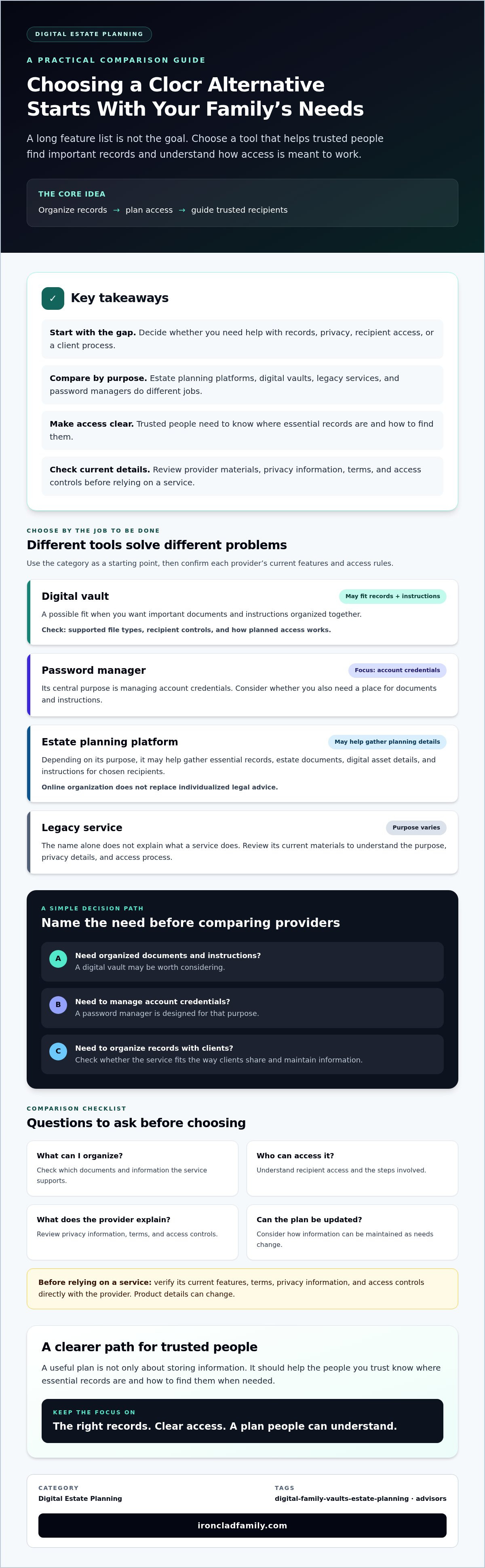
Organize records Plan access Guide recipients
**Category:** Digital Estate Planning
**Tag:** digital-family-vaults-estate-planning
## Key Takeaways
- Choose Clocr digital estate planning alternatives based on the specific gap you need to address, not feature count alone.
- Compare tool categories by asking what they help you organize, who can access the information, and what privacy details the provider explains.
- Make access instructions part of your plan so trusted people know where essential records are and how to find them.
- Use a short checklist to match your needs to a platform, whether you’re organizing family records or helping clients manage documents.
- A digital vault may suit people who need organized records and a clear plan for recipient access. Confirm the provider’s current features before choosing.
## Table of Contents
- [Why Look for Clocr Digital Estate Planning Alternatives?](https://www.ironcladfamily.com/blog/clocr-digital-estate-planning-alternatives-how-to-compare-your-options#why-look-for-clocr-digital-estate-planning-alternatives)
- [How Digital Estate Planning Alternatives Differ](https://www.ironcladfamily.com/blog/clocr-digital-estate-planning-alternatives-how-to-compare-your-options#how-digital-estate-planning-alternatives-differ)
- [Common Mistakes When Comparing Clocr Alternatives](https://www.ironcladfamily.com/blog/clocr-digital-estate-planning-alternatives-how-to-compare-your-options#common-mistakes-when-comparing-clocr-alternatives)
- [A Practical Checklist for Choosing a Clocr Alternative](https://www.ironcladfamily.com/blog/clocr-digital-estate-planning-alternatives-how-to-compare-your-options#a-practical-checklist-for-choosing-a-clocr-alternative)
- [When a Digital Vault May Be the Right Clocr Alternative](https://www.ironcladfamily.com/blog/clocr-digital-estate-planning-alternatives-how-to-compare-your-options#when-a-digital-vault-may-be-the-right-clocr-alternative)
## Why Look for Clocr Digital Estate Planning Alternatives?
**Key takeaway:** Start with one question: will the people you trust know where to find essential records and instructions? Choose a service to address a real gap, not simply to collect more features.
- [What a platform can help organize](https://www.ironcladfamily.com/blog/clocr-digital-estate-planning-alternatives-how-to-compare-your-options#organize)
- [When to consider an alternative](https://www.ironcladfamily.com/blog/clocr-digital-estate-planning-alternatives-how-to-compare-your-options#consider)
A plan can contain important information, but it only helps if the right people can find it and understand what to do. Before comparing Clocr digital estate planning alternatives, pinpoint what feels uncertain: document organization, privacy, recipient access, or a professional process for handling client records.
Families may want one place for key records and clear instructions for loved ones. Professionals may need a consistent way to organize information with clients. In either case, ask how access works, what information is protected, and how the plan can be updated.
For a practical introduction to the subject, watch this video about planning how family members may access accounts:
### What should an estate planning platform help you organize?
Depending on its purpose, a platform may help gather essential records, estate documents, details about digital assets, and instructions for chosen recipients. Digital inheritance involves more than saving files. It also raises questions about how digital accounts and other assets can be handled or passed on. The [Digital inheritance](https://en.wikipedia.org/wiki/Digital_inheritance) overview offers background on the topic and its challenges.
Check each provider’s current materials to see which documents it accepts and how recipient access works. Online organization can support your planning, but it doesn’t replace individualized legal advice about your situation.
### When might it make sense to consider an alternative?
Identify a specific missing capability before comparing vendors. Is your main need family access, privacy controls you understand, a particular type of document, or a workflow for organizing client records? Professionals should also consider whether a tool fits the way clients share and maintain information.
Verify Clocr’s current features, terms, privacy information, and access controls directly before drawing comparisons. Product details can change, and a clear match to your needs matters more than a broad feature list.
## How Digital Estate Planning Alternatives Differ
**A digital estate planning platform helps organize records and instructions so trusted people can understand what to look for and where to find it.** Compare a service by its purpose and current terms, not its label alone.
Use this guide to identify which category may fit your needs:
**Digital vault**
Best fit: Keeping important documents and instructions organized. Verify supported file types, recipient controls, and how planned access works.
**Password manager**
Best fit: Managing account credentials. Check whether it also supports documents or instructions, and review its terms for emergency or posthumous access.
**Cloud storage**
Best fit: Saving and sharing files. Confirm how permissions work, who can access shared items, and whether access planning goes beyond ordinary sharing.
**Will-making or broader planning tool**
Best fit: Creating estate documents or bringing several planning tasks together. Check which documents are offered and whether ongoing record organization and sharing are included.
These categories can overlap, but providers don’t all offer the same functions. One person may use several tools. If you do, keep a simple map of what each one holds and how trusted people can find it. Check each provider’s current terms for emergency or posthumous access rather than assuming a feature name explains the process.
### Separate document creation from record organization
A will-making tool may help create an estate document, while a different service may be needed to organize household records or share instructions. Check directly whether a provider offers state-specific wills, powers of attorney, or notary services, and confirm what each offering includes. Digital tools can support planning, but they don’t replace advice tailored to your circumstances.
### Coordinate the pieces of your plan
If you use separate services, note where key records are stored and what each tool is meant to do. Make sure your instructions point trusted people to the right place without assuming they’ll know which account to check first. This simple map can help your tools work together as part of one plan.
## Common Mistakes When Comparing Clocr Alternatives
A collection of well-organized files can still be hard to use if trusted people don’t know where to look or what to do next. Make the location of each file, the person who may need it, and the next step clear. Otherwise, orderly storage may not provide the guidance your family expects.
Keep that in mind as you compare services. A feature name alone doesn’t show how useful it will be in practice.
### Choosing by feature lists instead of family needs
Before reviewing provider pages, rank your priorities. Separate essential features from optional conveniences. A household may need a clear way to organize records and guide chosen recipients. A professional practice may need a consistent process for collecting and maintaining client information. For each advertised feature, ask what a user or recipient actually needs to do to use it.
- **Essential:** Which records need to be organized, and who may need to find them?
- **Essential:** What should a trusted person do if you can’t provide instructions?
- **Optional:** Which added tools would be helpful but aren’t necessary?
This short list keeps a polished feature page from distracting you from the problem you’re trying to solve.
### Assuming privacy and access work the same way everywhere
Terms like “secure” and “encrypted” need an explanation. Zero-knowledge encryption generally describes a design intended to prevent the provider from reading stored information. It doesn’t answer every question about account protection, recovery, or recipient access.
Ask how recipients are selected, what permissions they receive, and what recovery steps apply if you lose access. Read the current service terms, including any conditions for emergency or posthumous access. If a provider uses a broad security label, look for a plain-language description of what it covers and what it doesn’t.
Compare providers using details you can verify, not assumptions. A listed feature is a reason to ask questions, not proof that the service will work as you expect when someone needs it.
## A Practical Checklist for Choosing a Clocr Alternative
A careful review can prevent a simple mismatch: choosing a tool that stores records when what you need is a clear way for trusted people to find them. Use this checklist to compare Clocr digital estate planning alternatives against your needs, then confirm details in the provider’s current materials.
**Useful comparison criteria include clear privacy terms, suitable document tools, understandable recipient access, and a process that fits your household or practice.**
### Questions to ask about privacy, documents, and access
- **1. Define the job.** List the records, credentials, or instructions you need to organize. Separate essential features from optional ones.
- **2. Read the privacy explanation.** Ask what information is encrypted, who can access it, and whether the provider can view stored content. Look for plain-language explanations rather than relying on labels like “secure.”
- **3. Check document and recipient controls.** Confirm which file types the service supports, how you choose recipients, and what each recipient can see or do.
- **4. Understand access conditions.** Review what triggers emergency or posthumous access, what steps recipients must take, and how the process is explained to them.
- **5. Check what happens if plans change.** Review account recovery, data export, and deletion terms. Confirm how you can update records and recipient details.
- **6. Test the experience.** Before relying on a service, walk through the recipient instructions or test process it provides. Check that a trusted person can understand what to do without guessing.
### Assess the fit for your family or practice
Families can map essential records to the people who may need them. For example, note which person should know where to find key household, financial, or estate documents. Then check whether the platform’s access process supports that plan.
Professionals should consider whether a tool fits their client workflow, document management needs, and approach to branding. Ask how clients share information, how records stay organized, and what the platform allows the practice to present under its own name. For a related professional perspective, explore this [digital vault platform for advisors](https://www.ironcladfamily.com/advisor).
Don’t switch based on a feature list alone. Compare current policies, try the recipient experience, and choose the tool that closes a specific gap in your plan.
## When a Digital Vault May Be the Right Clocr Alternative
A digital vault may fit if your main concern is keeping important records organized and giving chosen people a clear, planned way to receive instructions or credentials. It may be less suited to a need focused only on creating a will or managing passwords. Match the tool to the gap you identified, then check the provider’s current terms before relying on its access process.
When comparing Clocr digital estate planning alternatives, consider whether a service supports both parts of your plan: keeping records together and helping the right people understand how to find them. A neatly stored document alone won’t explain who should receive it or what to do next.
### What to look for in a family digital vault
Assess document organization, privacy design, recipient selection, and emergency access as parts of one plan. Check what information can be stored, how recipients are chosen, and what instructions or credentials they may receive. Ask how and when delivery occurs, what steps recipients must take, and whether the provider’s terms explain access during an emergency or after a person’s death.
IronClad Family’s The Vault is one example in this category. It uses zero-knowledge encryption and includes automated delivery of essential instructions and credentials to chosen recipients during emergencies or after a person’s passing. IronClad Family also offers estate documents, including state-specific wills and powers of attorney. Review current service details to understand how each offering fits your needs.
For more information about this example, visit the [secure digital vault for families](https://ironcladfamily.com/digital-vault) page. Compare its details with other providers using the same questions rather than assuming every vault works the same way.
### A calm next step for protecting family records
Before opening or switching accounts, make a simple list of essential records and the people who may need them. Note where information is stored now, what instructions are missing, and which recipient should receive each type of information. Then review the provider’s privacy, access, recovery, export, and deletion terms.
If the platform includes estate documents, check that the document type and terms suit your situation. Digital tools can help organize a plan, but they don’t replace individualized legal advice. A clear list and careful review can help you choose with confidence.
[Learn how to protect your family’s most important documents with a secure digital vault.](https://ironcladfamily.com/digital-vault)
## Give Your Family a Clearer Path Forward
The right choice among Clocr digital estate planning alternatives depends on more than a list of features. Look for a tool that fits the records you need to organize, explains privacy and recipient access clearly, and helps trusted people understand what to do. Before you commit, review current terms and make sure someone else can follow your instructions.
For families considering a digital vault, IronClad Family’s The Vault uses zero-knowledge encryption and includes automated delivery features for essential instructions and credentials. IronClad Family also offers state-specific wills, powers of attorney, and remote online notary services. Review the details directly and consider whether those tools fit your family’s needs.
[Learn how to protect your family’s most important documents with a secure digital vault.](https://ironcladfamily.com)
A thoughtful plan doesn’t need to be complicated. Start with the records that matter and the people who may need them. Each clear step can help your family feel more prepared.
## Frequently Asked Questions
### What are the best alternatives to Clocr for digital estate planning?
The best fit depends on what you need a service to do. Consider a digital vault for organizing records and planning recipient access, a password manager for account credentials, or an estate planning platform for document creation. Some services may combine these functions, so compare their current features and terms directly. For Clocr digital estate planning alternatives, focus on privacy, document tools, family access, and fit with your needs.
### Is Clocr a digital vault or an estate planning tool?
Check Clocr’s current official materials to see which functions it offers. A digital vault generally centers on organizing information, while estate planning tools may help with documents or other planning tasks. A service can include more than one type of feature, so its label alone may not explain what it does. Confirm the available documents, storage options, privacy terms, and recipient access process before comparing it with another service.
### How do I compare digital estate planning platforms?
Start by listing what you need to organize and who may need access. Then compare each platform’s privacy explanation, supported documents, recipient controls, recovery steps, export options, and service terms. Ask providers to explain how access works in practice, including any emergency or posthumous process. If you’re choosing for a household, check whether a trusted person can follow the instructions. Professionals should also consider how a platform fits their client workflow.
### Can a password manager replace a digital estate planning vault?
Not always. A password manager may help organize login credentials, but that doesn’t mean it also stores estate documents, family records, or instructions. Check its current features and terms, especially how emergency access works and what information a recipient can see. If you use separate tools, keep a clear record of what each one holds and how trusted people can find it. The goal is a coordinated plan, not simply saved passwords.
### Is zero-knowledge encryption enough when choosing a digital vault?
No. Zero-knowledge encryption describes a privacy design intended to keep stored information unreadable to the provider, but it doesn’t answer every security or access question. Review how recipients are selected, what recovery options exist, and what happens if you lose access to your account. Read the provider’s current terms and security information, and make sure you understand how chosen people would receive instructions or credentials.
### Can a digital estate planning service create a valid will?
Some services offer will-making tools, but a platform’s ability to create a document doesn’t by itself confirm whether it suits your needs or meets the rules that apply to you. Check what type of will is offered, how it is completed, and what steps may be needed for your situation. IronClad Family offers state-specific wills, but consider seeking individualized legal advice if you’re unsure whether a document is appropriate.
### What should families organize before choosing a Clocr alternative?
Make a simple inventory of important records, such as estate documents, financial information, insurance details, and digital account instructions. Note where each item is currently kept and which trusted person may need to find it. Then identify what’s missing: organized storage, recipient access, credentials, or clearer directions. This list gives you a practical way to compare Clocr alternatives and see whether a provider’s features and terms support your family’s plan.

### Michael Lester
I spent years flying Marine Corps combat missions believing I understood America’s role in the world. Today I work in national security and cybersecurity, helping organizations understand risk, resilience, and the systems we rely on. My writing continues the same mission—bringing clarity to complex issues and inviting people to look past slogans so we can understand who we are, what we do in the world, and why it matters.
## Latest posts
- [ALL POSTS](https://www.ironcladfamily.com/blog/all)
[](https://www.ironcladfamily.com/blog/clocr-digital-estate-planning-alternatives-how-to-compare-your-options)
Sep 26, 2026, 6:15:45 AM
### [Clocr Digital Estate Planning Alternatives: How to Compare Your Options](https://www.ironcladfamily.com/blog/clocr-digital-estate-planning-alternatives-how-to-compare-your-options)
[](https://www.ironcladfamily.com/blog/legacybox-alternatives-a-family-guide-to-digital-document-vaults)
Sep 25, 2026, 8:53:48 AM
### [Legacybox Alternatives: A Family Guide to Digital Document Vaults](https://www.ironcladfamily.com/blog/legacybox-alternatives-a-family-guide-to-digital-document-vaults)
---
[](https://ironcladfamily.com)
**66 W. Flagler Street, Suite 900**
**Miami, FL 33130**
**United States**
[Tel: 1-786-360-1352](tel:7863601352)
[admin@ironcladfamily.com](mailto:admin@ironcladfamily.com)
#### Products
#### Pages
- [Physical Protection](https://shop.ironcladfamily.com)
- [Digital Protection](https://www.ironcladfamily.com/digital-vault)
- [Advisors](https://www.ironcladfamily.com/advisor)
- [Pricing](https://www.ironcladfamily.com/plans-and-pricing)
- [Security](https://www.ironcladfamily.com/security)
- [Contact](https://www.ironcladfamily.com/contact-us)
#### Learn
- [FAQ](https://www.ironcladfamily.com/faq)
- [Learning Center](https://www.ironcladfamily.com/learning-center)
- [Support](https://support.ironcladfamily.com)
### Get family protection tips and holistic advisor insights!
- [Terms and Services](https://www.ironcladfamily.com/terms-and-conditions)
- [Privacy Policy](https://www.ironcladfamily.com/privacy-policy)
© 2026 IronClad Family. All Rights Reserved. [Follow us on Facebook](https://www.facebook.com/ironcladfamily) [Follow us on LinkedIn](https://www.linkedin.com/company/ironcladfamily) [Follow us on Twitter](https://twitter.com/IronClad_Family) [Follow us on Facebook](https://www.instagram.com/ironcladfamily)
```json
{
"@context" : "https://schema.org",
"@type" : "BlogPosting",
"author" : {
"@type" : "Person",
"name" : "Michael Lester",
"url" : "https://www.ironcladfamily.com/blog/author/michael-lester"
},
"datePublished" : "2026-09-26T10:15:45.000Z",
"headline" : "Clocr Digital Estate Planning Alternatives: How to Compare Your Options",
"image" : [ "https://getautoseo.com/storage/hero_images/clocr-digital-estate-planning-alternatives-how-to-compare-your-options.jpg?v=410767b1fdf1" ],
"mainEntityOfPage" : {
"@id" : "https://www.ironcladfamily.com/blog/clocr-digital-estate-planning-alternatives-how-to-compare-your-options",
"@type" : "WebPage"
},
"publisher" : {
"@type" : "Organization",
"logo" : {
"@type" : "ImageObject",
"url" : "https://www.ironcladfamily.com/hubfs/Logo%20PNG-1.png"
},
"name" : "IronClad Family"
}
}
```
```json
{
"@context" : "https://schema.org",
"@type" : "Organization",
"address" : {
"@type" : "PostalAddress",
"addressCountry" : "US",
"addressLocality" : "Miami",
"addressRegion" : "FL",
"postalCode" : "33130",
"streetAddress" : "66 W. Flagler St #900"
},
"areaServed" : {
"@type" : "Country",
"name" : "United States"
},
"description" : "Veteran-owned family protection and digital legacy company offering zero-knowledge encrypted digital vaults.",
"email" : "admin@ironcladfamily.com",
"foundingLocation" : {
"@type" : "Place",
"address" : {
"@type" : "PostalAddress",
"addressCountry" : "US",
"addressLocality" : "Miami",
"addressRegion" : "FL"
}
},
"logo" : "https://8926831.fs1.hubspotusercontent-na1.net/hubfs/8926831/Optimization-2022/Logo%20PNG-1.webp",
"name" : "IronClad Family LLC",
"sameAs" : [ "https://www.facebook.com/ironcladfamily", "https://www.linkedin.com/company/ironcladfamily" ],
"telephone" : "+17863601352",
"url" : "https://www.ironcladfamily.com"
}
```
```json
{
"@context" : "https://schema.org",
"@type" : "NewsArticle",
"alternativeHeadline" : "Explore the best Clocr digital estate planning alternatives. Compare digital vaults and tools to protect family records and ensure easy access when needed.",
"author" : {
"@type" : "Person",
"name" : "Michael Lester",
"url" : "https://www.linkedin.com/in/michaellester"
},
"dateModified" : "2026-09-26T10:15:45+0000",
"datePublished" : "2026-09-26T10:15:45+0000",
"description" : "Explore the best Clocr digital estate planning alternatives. Compare digital vaults and tools to protect family records and ensure easy access when needed.",
"headline" : "<span id="hs_cos_wrapper_name" class="hs_cos_wrapper hs_cos_wrapper_meta_field hs_cos_wrapper_type_text" style="" data-hs-cos-general-type="meta_field" data-hs-cos-type="text" >Clocr Digital Estate Planning Alternatives: How to Compare Your Options</span>",
"image" : "https://getautoseo.com/storage/hero_images/clocr-digital-estate-planning-alternatives-how-to-compare-your-options.jpg?v=410767b1fdf1",
"mainEntityOfPage" : {
"@id" : "https://www.ironcladfamily.com/blog/clocr-digital-estate-planning-alternatives-how-to-compare-your-options",
"@type" : "WebPage"
},
"publisher" : {
"@type" : "Organization",
"logo" : {
"@type" : "ImageObject",
"height" : 60,
"url" : "https://blog.ironcladfamily.com/path-to-logo.png",
"width" : 600
},
"name" : "IronClad Family"
}
}
```