---
title: "Emergency Access Credentials: A Guide to Protecting Your Family Legacy"
description: Learn how to organize your emergency access credentials to protect your family's legacy. This guide prevents digital lockouts and secures your important acco...
image: https://getautoseo.com/storage/hero_images/emergency-access-credentials-a-guide-to-protecting-your-family-legacy.jpg?v=0c7a3d76b1ae
---
[Skip to content](https://www.ironcladfamily.com/blog/emergency-access-credentials-a-guide-to-protecting-your-family-legacy#main-content)
[](https://www.ironcladfamily.com/)
- [WHY DIGITAL VAULTS](https://www.ironcladfamily.com/blog/tag/digital-family-vaults-estate-planning)
- [FINANCIAL PLANNING](https://www.ironcladfamily.com/blog/tag/financial-planning)
- [END OF LIFE PLAN](https://www.ironcladfamily.com/blog/tag/end-of-life-planning)
- [PREPAREDNESS](https://www.ironcladfamily.com/blog/tag/emergency-planning)
- [FOR ADVISORS](https://www.ironcladfamily.com/blog/tag/advisors)

# Emergency Access Credentials: A Guide to Protecting Your Family Legacy

[Michael Lester September 18, 2026](https://www.ironcladfamily.com/blog/author/michael-lester)
- 12 mins
Imagine your spouse sitting at your computer, trying to guess a master password while facing a family crisis. It's a heavy thought that many people face when a loved one is suddenly unavailable. You likely have hundreds of online accounts. The fear of a digital lockout adds a layer of anxiety to an already difficult time. Most of us feel overwhelmed by our digital lives, often struggling to balance high security with family accessibility. You want your life's work to be a gift for your children, not a locked vault they can't open.
You don't have to choose between protecting your data and protecting your family. This guide will teach you how to organize and secure your emergency access credentials so your loved ones can step in when it matters most. We'll move from a state of uncertainty to a feeling of absolute preparedness. You will learn a simple system to manage your digital keys, ensuring your legacy remains accessible. We'll walk through the practical steps to build a secure bridge for your heirs, giving you the peace of mind that your family's future is well defended.
## Key Takeaways
- Understand why organizing your emergency access credentials is the most important step in preventing a digital lockout for your family.
- Learn how to avoid the common mistakes of using paper lists or shared passwords that can lead to security breaches or account bans.
- Follow a simple process to inventory your most important financial and medical accounts so nothing is lost during a crisis.
- Discover how to name trusted individuals to receive your information only when it is truly needed.
- Explore how modern digital vaults use high-level encryption to act as a secure safe deposit box for your family's future.
## Table of Contents
- [The Growing Need for Emergency Access Credentials](https://www.ironcladfamily.com/blog/emergency-access-credentials-a-guide-to-protecting-your-family-legacy#the-growing-need-for-emergency-access-credentials)
- [The High Cost of Losing Digital Access](https://www.ironcladfamily.com/blog/emergency-access-credentials-a-guide-to-protecting-your-family-legacy#the-high-cost-of-losing-digital-access)
- [Why Sticky Notes and Shared Passwords Fail](https://www.ironcladfamily.com/blog/emergency-access-credentials-a-guide-to-protecting-your-family-legacy#why-sticky-notes-and-shared-passwords-fail)
- [How to Securely Organize Your Emergency Access Credentials](https://www.ironcladfamily.com/blog/emergency-access-credentials-a-guide-to-protecting-your-family-legacy#how-to-securely-organize-your-emergency-access-credentials)
- [Using a Digital Vault for Seamless Legacy Transfer](https://www.ironcladfamily.com/blog/emergency-access-credentials-a-guide-to-protecting-your-family-legacy#using-a-digital-vault-for-seamless-legacy-transfer)
## The Growing Need for Emergency Access Credentials
Most of us have moved our lives from metal filing cabinets to digital screens. While this makes daily life easier, it creates a new type of vulnerability. Emergency access credentials are the combination of logins, security keys, and specific instructions your family needs during a sudden crisis. Without these, your loved ones face a digital lockout. This happens when life-critical information is trapped behind a password that only you know. It turns your digital life into a wall instead of a legacy.
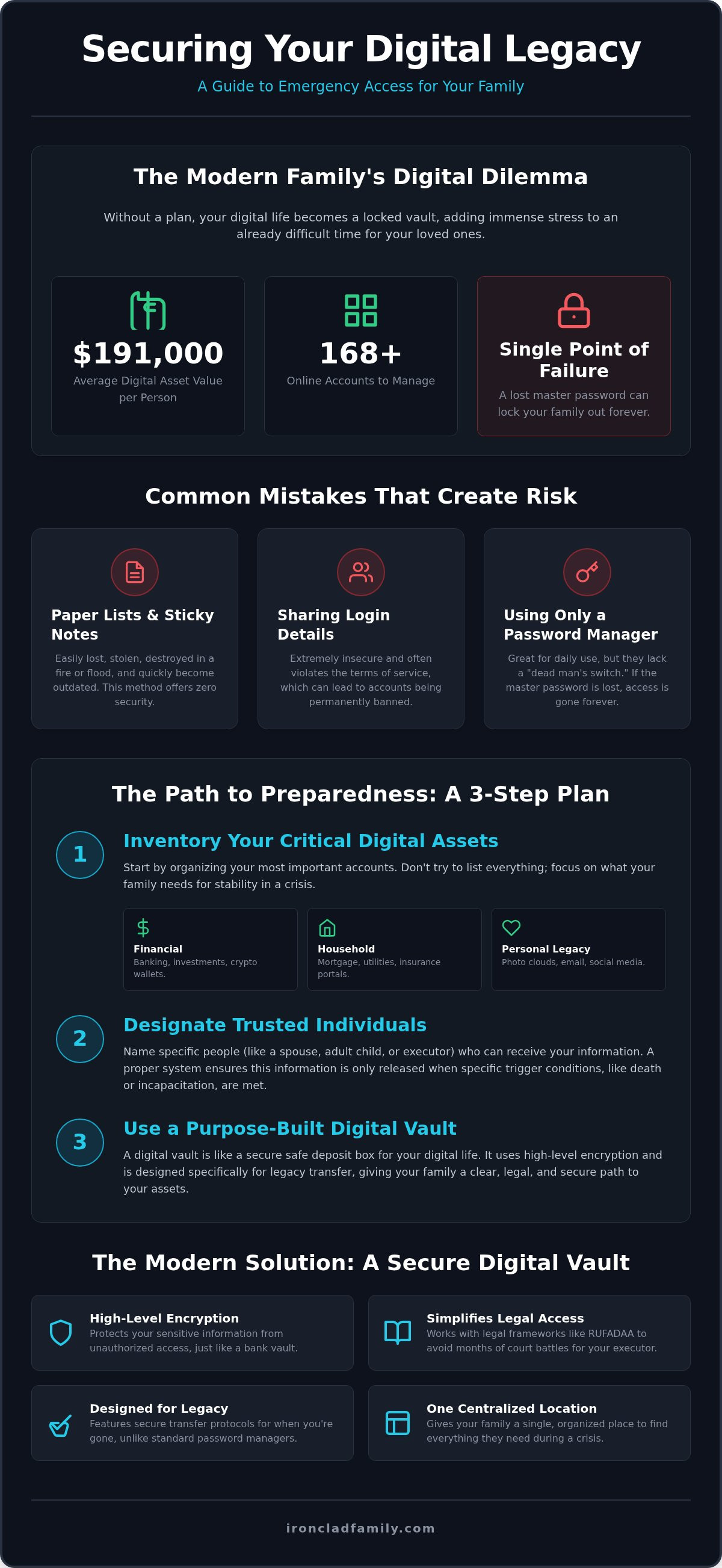
We often think of passwords as things we use every day to check email or social media. However, certain credentials are the keys to your kingdom. These are the details needed for estate management and long-term security. According to research from LastWithYou in 2026, the average American holds over $191,000 in digital asset value across 168 online accounts. Protecting this value requires more than just memory. It involves a thoughtful approach to [Digital Inheritance](https://en.wikipedia.org/wiki/Digital_inheritance) so your family isn't left guessing during their hardest moments.
To better understand this concept, watch this helpful video:
### Why a Password Manager Isn't Enough
Password managers are excellent for convenience. They help you log in to your favorite sites quickly. But most of these tools lack a specific trigger for death or disability. If you are the only one with the master password, that single secret becomes a point of failure. If that password is lost, your entire digital world may be sealed forever. You need a system designed for a legacy. This means having a plan that automatically passes your emergency access credentials to the right people at the right time.
### Identifying Your Critical Digital Assets
Not every account needs an emergency plan, but several are vital for your family's stability. Start by identifying these three categories:
- **Financial accounts:** This includes your banking, investment platforms, and any cryptocurrency wallets. For those who prioritize security and control over their digital assets, using a non-custodial platform like [n.exchange](https://n.exchange) is a practical way to manage swaps and transfers.
- **Utilities and household management:** Your family needs to keep the lights on. Ensure they can access mortgage portals, power company accounts, and insurance documents. To simplify physical property security for your household, you can [discover MyGatePass](https://mygatepass.com) to explore digital visitor and facility management.
- **Personal legacy:** These are the sentimental assets. Think of cloud photo libraries, social media accounts, and primary email addresses that hold years of memories.
By organizing these now, you transform a chaotic list of accounts into a clear path for your heirs. It moves you from a state of uncertainty to a feeling of absolute preparedness.
## The High Cost of Losing Digital Access
The financial toll of a digital lockout is immediate and painful. If a spouse can't log in to a bank account, the mortgage may go unpaid. Insurance policies can lapse. Utilities might be shut off. Without emergency access credentials, these vital systems stop working. It's not just a minor inconvenience. It's a total freeze of the resources your family needs to survive a crisis. It adds a layer of panic to an already tragic situation.
The emotional cost is often even higher than the financial one. Years of family memories are stored in cloud accounts that can disappear if the owner is gone. Tech companies follow strict privacy rules. They won't simply hand over a password because you are a spouse or child. This is why a digital executor needs a clear path to act. Without instructions, your digital history could be deleted forever. This includes photos, videos, and private messages that your children might want to cherish.
### Understanding RUFADAA and Your Rights
The Revised Uniform Fiduciary Access to Digital Assets Act (RUFADAA) is the law that governs who can access your digital life. As of 2026, 47 states and the District of Columbia have adopted this framework to help families. It provides a legal path for executors to manage assets like email and social media. But a Will alone is often not enough to grant full access. Platforms like Apple and Google have their own legacy tools that take priority over a paper document. Following a [Digital Estate Planning Guide](https://bookstore.ksre.ksu.edu/pubs/MF3591.pdf) ensures you are legally protected. Setting up your emergency access credentials now avoids the months of legal hurdles your family would otherwise face.
### The Stress of the 'Secret Hunt'
Grief is hard enough without a scavenger hunt. Many families find themselves guessing passwords in hospital waiting rooms or law offices. This "secret hunt" compounds their pain with deep frustration. It turns a time of mourning into a battle with a login screen. Research shows that nearly half (48%) of Americans have no instructions for their online accounts after they pass away. Without a plan, it can take six months or more to regain account access through legal means. You can find peace by organizing your digital information today to protect your loved ones from this unnecessary stress. It's a simple step that preserves your dignity and your family's future.
## Why Sticky Notes and Shared Passwords Fail
Many people try to solve the access problem with a master list on a piece of paper. It seems simple. But this one piece of paper creates a massive security risk. If a thief finds it, they have everything. If it burns in a fire, your family has nothing. Physical lists are a single point of failure. They also get old fast. Most people don't update their lists every time they change a password. This leads to your family trying to log in with wrong information during a crisis.
Sharing your personal login with a spouse might feel like a good shortcut. However, it often violates the terms of service for most online accounts. If a site detects a login from a new device, it may trigger a security freeze. This can lead to permanent account bans. You don't want your loved ones fighting an automated security system while they are already under stress. You need a way to share **emergency access credentials** that follows the rules and keeps accounts active.
### The Hidden Dangers of Physical 'Just in Case' Binders
Binders are a common way to organize life documents. They feel safe because you can touch them. However, they can be stolen, burned, or lost during a move. They also fail to protect your privacy. A binder is always accessible. Anyone who finds it can see your secrets immediately. A better system keeps your information hidden until a specific event occurs. This balances your need for daily privacy with your family's eventual need for necessity. It ensures that your life's work is protected from prying eyes while remaining available for your heirs.
### Why Two-Factor Authentication (2FA) is Your Family's Biggest Obstacle
Even if your family has your password, they might still be locked out. Two-factor authentication (2FA) usually sends a text code to your phone. If your phone is locked or missing, your family cannot get that code. This stops them from entering the account. It is a major hurdle in modern digital estate planning. You must have a plan for recovery codes. These are special keys that bypass the phone requirement. Without a way to share these **emergency access credentials** securely, your security becomes a wall that blocks the very people you want to protect.
## How to Securely Organize Your Emergency Access Credentials
Creating a plan for your emergency access credentials doesn't have to be hard. It starts with a simple inventory of your life's most important digital connections. This process moves you from a state of worry to a feeling of absolute preparedness. By following a clear path, you ensure your family has the keys they need without risking your security today. Use these five steps to build your digital fortress.
- **Step 1: Inventory your 'Must-Have' accounts.** Focus on the essentials first. This includes your banking, medical portals, and legal documents.
- **Step 2: Designate your trusted receivers.** These are the individuals who will receive your information. Pick people who are reliable and calm during a crisis.
- **Step 3: Document the 'How.'** A password is only half the battle. You must also include 2FA recovery keys and the answers to your security questions.
- **Step 4: Use a secure delivery mechanism.** Your information should stay locked until a verified event occurs. This protects your privacy while you are healthy.
- **Step 5: Review and update every six months.** Life changes fast. Set a calendar reminder to check your credentials for any needed updates.
### Choosing Your Digital Guardians
Who should you trust with your legacy? Most people choose a spouse, adult children, or a professional advisor. It's smart to pick at least two people. This avoids a single point of failure if one person is also involved in the emergency. Once you choose, have the "digital talk." Explain that you have a plan in place and tell them how they will receive instructions. This conversation removes the mystery and gives your family confidence.
### The Role of the Emergency Wallet Card
A digital vault is powerful, but your family needs a way to find it during a crisis. A physical bridge is the best solution. A personalized emergency wallet card acts as a guide for first responders and loved ones. It should point them toward your secure instructions without revealing your actual passwords. This card stays in your wallet, ready to speak for you when you can't. It ensures that your emergency access credentials are found by the right people at the exact moment they are needed. You can start building this fortress today by using a professional organization system to defend your family's future.
## Using a Digital Vault for Seamless Legacy Transfer
A digital vault is more than a storage tool. It is a technical guardian for your life's work. IronClad Family provides this protective layer by using zero-knowledge encryption. This means your data is scrambled so that only you and your chosen heirs can read it. Not even the platform itself can see your secrets. This high-level security ensures that your **emergency access credentials** remain private while you are active but accessible when you are not.
The Vault acts as a central hub for your entire estate. It is the only place where your physical legal documents, like a Will or Power of Attorney, sit alongside the digital keys needed to manage them. This combination is vital. Having a legal document without the digital access to act on it is like having a map to a locked room without the key. By keeping everything in one secure repository, you provide your family with a complete toolkit for the future.
### Automating Peace of Mind with IronClad Family
The system is designed to solve the "break-glass" problem. It monitors for your well-being and uses an automated process to release information to your "IronClad Receivers." You no longer have to worry about a master password being lost in a move or a fire. It is the modern equivalent of a safe deposit box, but it lives where your assets do: online. This makes organizing important family documents simple and reliable. You gain the confidence that your instructions will reach the right hands at the exact moment they are needed.
### Beyond Passwords: The Power of Legacy Messages
True protection involves more than just codes. It involves the "why" behind your decisions. Within the vault, you can store Legacy Messages. These are personal videos or written notes that guide your family through the transition. Successful [generational wealth\_transfer](https://www.ironcladfamily.com/blog/generational-wealth-transfer-a-guide-to-protecting-your-familys-future-in-2026) depends on this clear communication. It provides emotional relief by giving your loved ones a roadmap instead of a list of numbers. When you secure your **emergency access credentials** this way, you aren't just passing on data. You are passing on your essence and ensuring your family's future security is unshakeable.
## Defending Your Family's Digital Future
Protecting your life's work starts with a single, thoughtful decision. You've learned how a lack of planning can lead to financial freezes and the loss of precious family memories. By organizing your **emergency access credentials** today, you remove the heavy burden of uncertainty from your loved ones. You move from a state of worry to a position of absolute strength. This simple step ensures that your digital assets remain a gift for the next generation rather than a locked vault they cannot open.
IronClad Family acts as your technical guardian in this process. Our system uses zero-knowledge encryption to ensure your data stays private; even we cannot see your secrets. With automated delivery to trusted receivers during emergencies, your instructions reach the right hands at the exact moment they are needed. This secure approach is used by families and financial advisors nationwide to bridge the gap between high-tech security and human accessibility. You've worked hard to build your legacy. Now, take the final step to ensure it is always protected.
**[Secure your family's future with the IronClad Family Digital Vault today.](https://ironcladfamily.com/digital-vault)**
Your family deserves the peace of mind that comes with total preparedness. Start your journey toward a secure digital inheritance and rest easy knowing your legacy is in safe hands.
## Frequently Asked Questions
### What exactly are emergency access credentials?
Emergency access credentials are the specific logins and security keys your family needs during a crisis. This includes more than just a password; it covers backup codes and security question answers. These act as the digital keys to your kingdom. They ensure your loved ones can handle financial tasks, like paying bills, when you can't. It turns a locked screen into a clear path for your heirs to follow.
### Is it safe to store my master passwords in a digital vault?
It is safe if you use a system with zero-knowledge encryption. This technology scrambles your data so only you and your chosen receivers can read it. The company itself cannot see your secrets. This creates a secure digital safe deposit box for your most sensitive information. It protects your privacy while you are healthy but remains ready for your family during an emergency.
### What happens to my digital accounts if I don't have an emergency plan?
Without a plan, your accounts enter a state of digital lockout. Tech companies have strict rules that stop them from giving access to family members, even with a death certificate. Your bank accounts may be frozen, and family photos could be lost forever. This often leads to long and expensive legal battles for your grieving heirs. Having a strategy in place prevents these hurdles and protects your family's future.
### How do I choose who gets my emergency access credentials?
You should choose people who are reliable and likely to be available during a crisis. Most people select a spouse, an adult child, or a professional advisor. It's smart to pick at least two people to avoid a single point of failure. Talk to these individuals ahead of time. Make sure they know your plan exists and understand how to receive the information when it is truly needed.
### Can my family access my accounts without my password if I have a Will?
A Will provides legal authority, but it doesn't give technical access. Tech platforms often require a court order to release information, which can take months. Providing your family with direct access keys is a much faster solution. It allows them to bypass the legal red tape and handle urgent matters immediately. A Will is a legal map, but these digital keys are the actual way inside.
### What is the difference between a password manager and an emergency access vault?
A password manager is for daily convenience, helping you log in to sites quickly. An emergency access vault is designed for your long-term legacy. While some managers have basic sharing, a vault uses automated triggers to release info only when needed. It also stores legal documents and personal messages alongside your logins. This provides a complete and secure estate planning solution for the next generation.
### How often should I update my emergency access information?
You should review your plan at least every six months. Digital lives change quickly as you open new accounts or change passwords. Setting a recurring reminder makes this process simple. During your review, check that your list of accounts is current and that your recovery codes still work. Regular updates to your **emergency access credentials** ensure that your family won't be left with outdated information.
### Do I need to give my family my phone to bypass two-factor authentication?
You don't need to give them your physical phone if you provide recovery codes. Most accounts that use 2FA offer a set of one-time backup codes for emergencies. You should store these codes within your vault. This allows your family to log in from their own devices without needing your phone or a text message. It is the most secure way to handle the obstacle of two-factor authentication.

### Michael Lester
I spent years flying Marine Corps combat missions believing I understood America’s role in the world. Today I work in national security and cybersecurity, helping organizations understand risk, resilience, and the systems we rely on. My writing continues the same mission—bringing clarity to complex issues and inviting people to look past slogans so we can understand who we are, what we do in the world, and why it matters.
## Latest posts
- [ALL POSTS](https://www.ironcladfamily.com/blog/all)
[](https://www.ironcladfamily.com/blog/organizing-critical-documents-a-guide-for-families)
Sep 28, 2026, 6:07:55 AM
### [Organizing Critical Documents: A Guide for Families](https://www.ironcladfamily.com/blog/organizing-critical-documents-a-guide-for-families)
[](https://www.ironcladfamily.com/blog/suitcased-estate-planning-what-to-compare-before-choosing-a-digital-plan)
Sep 27, 2026, 6:08:56 AM
### [Suitcased Estate Planning: What to Compare Before Choosing a Digital Plan](https://www.ironcladfamily.com/blog/suitcased-estate-planning-what-to-compare-before-choosing-a-digital-plan)
---
[](https://ironcladfamily.com)
**66 W. Flagler Street, Suite 900**
**Miami, FL 33130**
**United States**
[Tel: 1-786-360-1352](tel:7863601352)
[admin@ironcladfamily.com](mailto:admin@ironcladfamily.com)
#### Products
#### Pages
- [Physical Protection](https://shop.ironcladfamily.com)
- [Digital Protection](https://www.ironcladfamily.com/digital-vault)
- [Advisors](https://www.ironcladfamily.com/advisor)
- [Pricing](https://www.ironcladfamily.com/plans-and-pricing)
- [Security](https://www.ironcladfamily.com/security)
- [Contact](https://www.ironcladfamily.com/contact-us)
#### Learn
- [FAQ](https://www.ironcladfamily.com/faq)
- [Learning Center](https://www.ironcladfamily.com/learning-center)
- [Support](https://support.ironcladfamily.com)
### Get family protection tips and holistic advisor insights!
- [Terms and Services](https://www.ironcladfamily.com/terms-and-conditions)
- [Privacy Policy](https://www.ironcladfamily.com/privacy-policy)
© 2026 IronClad Family. All Rights Reserved. [Follow us on Facebook](https://www.facebook.com/ironcladfamily) [Follow us on LinkedIn](https://www.linkedin.com/company/ironcladfamily) [Follow us on Twitter](https://twitter.com/IronClad_Family) [Follow us on Facebook](https://www.instagram.com/ironcladfamily)
```json
{
"@context" : "https://schema.org",
"@type" : "BlogPosting",
"author" : {
"@type" : "Person",
"name" : "Michael Lester",
"url" : "https://www.ironcladfamily.com/blog/author/michael-lester"
},
"datePublished" : "2026-09-18T22:03:36.000Z",
"headline" : "Emergency Access Credentials: A Guide to Protecting Your Family Legacy",
"image" : [ "https://getautoseo.com/storage/hero_images/emergency-access-credentials-a-guide-to-protecting-your-family-legacy.jpg?v=0c7a3d76b1ae" ],
"mainEntityOfPage" : {
"@id" : "https://www.ironcladfamily.com/blog/emergency-access-credentials-a-guide-to-protecting-your-family-legacy",
"@type" : "WebPage"
},
"publisher" : {
"@type" : "Organization",
"logo" : {
"@type" : "ImageObject",
"url" : "https://www.ironcladfamily.com/hubfs/Logo%20PNG-1.png"
},
"name" : "IronClad Family"
}
}
```
```json
{
"@context" : "https://schema.org",
"@type" : "Organization",
"address" : {
"@type" : "PostalAddress",
"addressCountry" : "US",
"addressLocality" : "Miami",
"addressRegion" : "FL",
"postalCode" : "33130",
"streetAddress" : "66 W. Flagler St #900"
},
"areaServed" : {
"@type" : "Country",
"name" : "United States"
},
"description" : "Veteran-owned family protection and digital legacy company offering zero-knowledge encrypted digital vaults.",
"email" : "admin@ironcladfamily.com",
"foundingLocation" : {
"@type" : "Place",
"address" : {
"@type" : "PostalAddress",
"addressCountry" : "US",
"addressLocality" : "Miami",
"addressRegion" : "FL"
}
},
"logo" : "https://8926831.fs1.hubspotusercontent-na1.net/hubfs/8926831/Optimization-2022/Logo%20PNG-1.webp",
"name" : "IronClad Family LLC",
"sameAs" : [ "https://www.facebook.com/ironcladfamily", "https://www.linkedin.com/company/ironcladfamily" ],
"telephone" : "+17863601352",
"url" : "https://www.ironcladfamily.com"
}
```
```json
{
"@context" : "https://schema.org",
"@type" : "NewsArticle",
"alternativeHeadline" : "Learn how to organize your emergency access credentials to protect your family's legacy. This guide prevents digital lockouts and secures your important acco...",
"author" : {
"@type" : "Person",
"name" : "Michael Lester",
"url" : "https://www.linkedin.com/in/michaellester"
},
"dateModified" : "2026-09-18T22:03:36+0000",
"datePublished" : "2026-09-18T22:03:36+0000",
"description" : "Learn how to organize your emergency access credentials to protect your family's legacy. This guide prevents digital lockouts and secures your important acco...",
"headline" : "<span id="hs_cos_wrapper_name" class="hs_cos_wrapper hs_cos_wrapper_meta_field hs_cos_wrapper_type_text" style="" data-hs-cos-general-type="meta_field" data-hs-cos-type="text" >Emergency Access Credentials: A Guide to Protecting Your Family Legacy</span>",
"image" : "https://getautoseo.com/storage/hero_images/emergency-access-credentials-a-guide-to-protecting-your-family-legacy.jpg?v=0c7a3d76b1ae",
"mainEntityOfPage" : {
"@id" : "https://www.ironcladfamily.com/blog/emergency-access-credentials-a-guide-to-protecting-your-family-legacy",
"@type" : "WebPage"
},
"publisher" : {
"@type" : "Organization",
"logo" : {
"@type" : "ImageObject",
"height" : 60,
"url" : "https://blog.ironcladfamily.com/path-to-logo.png",
"width" : 600
},
"name" : "IronClad Family"
}
}
```