

- 11 mins
What if your family’s important records are organized, but no one knows how to find them in an emergency? That’s the central question when evaluating legacy planning costs versus an automated family emergency vault. Price matters, but so do privacy, recipient access, and whether loved ones can receive useful instructions when they need them.
Common mistakes: comparing subscription prices alone, leaving recipient details outdated, or assuming stored documents will automatically reach loved ones. A careful comparison looks at what each plan includes and how its access process works.
Key Takeaways
- Compare current plan details side by side, including billing period, users, storage, and support.
- Look beyond storage to see how designated recipients can access important information during an emergency.
- Use the comparison of Everplans pricing vs automated family emergency vault options to weigh cost against the access process your family needs.
- Before choosing, list the records you want to organize, who may need them, and how those people should receive access.
Why compare Everplans pricing with an automated family emergency vault?
A family may have insurance records, account details, and care instructions in place, yet loved ones may not know where to find them when time matters. A digital vault brings important family information together in an organized, protected space. Services can handle access differently, though. Comparing Everplans pricing vs automated family emergency vault options means looking beyond the subscription fee to what happens when someone needs the information.
A person’s online accounts, files, and other digital information can form part of their digital legacy. A vault can help organize these records with practical details, such as where to find key documents or whom to contact. Compare secure storage with features designed to deliver selected instructions or credentials to chosen recipients through a defined process.
What does a family emergency vault help organize?
Depending on what a person chooses to include, a vault may hold important records, account details, and practical instructions for loved ones. For example, it could note where to find insurance information or how to reach a trusted contact. Families decide what to organize, what to share, and with whom. The goal is to make useful information easier to locate while respecting each household’s choices.
Why does access planning matter as much as storage?
During an illness, accident, or loss, relatives may be under stress and unsure what to do first. Even well-organized records can be hard to use if loved ones don’t know where they are or how to access them. Clear instructions can help designated people find relevant details and understand possible next steps.
Stored information stays in the vault; delivered guidance is sent to a designated person through an access process. That distinction matters when comparing services. One may focus on organizing information for later reference, while another may include a way to deliver selected instructions or credentials during an emergency. Consider who receives information, what they receive, and what conditions apply before deciding which approach fits your family.
Before comparing plan costs, list the records your family wants to organize and the people who may need them. Then decide whether secure storage meets those needs or whether a planned delivery process would also be useful. This gives you a practical basis for weighing price against preparedness.
How to compare Everplans pricing without relying on an outdated figure: Everplans pricing vs automated family emergency vault
Plan details can change, so an old review may not show what a family would pay today. Before comparing services, check each provider’s current official pricing page and note when you reviewed it. Compare what each plan includes, not just the listed fee.
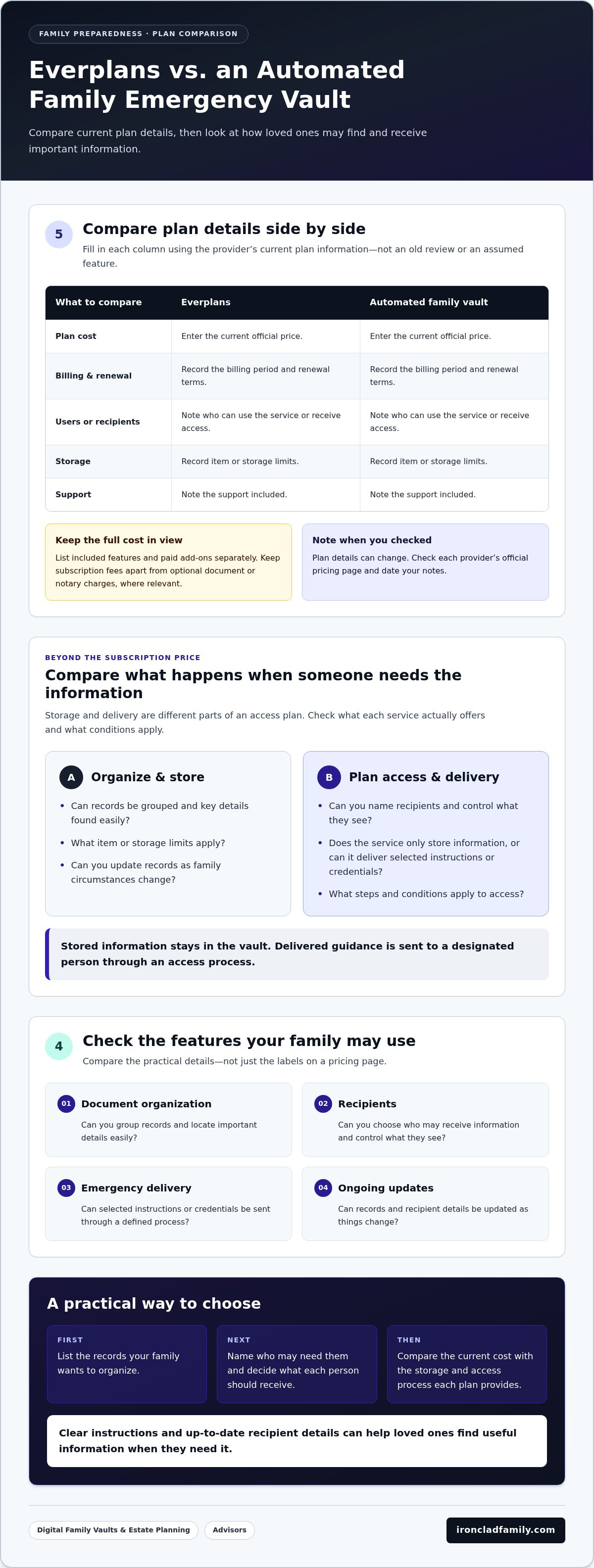
Use the same fields for each option. Fill in the table with current plan information rather than assuming services include the same features.
| Comparison field | Everplans | Automated family vault |
|---|---|---|
| Plan cost | Enter current official price | Enter current official price |
| Billing and renewal | Record billing period and renewal terms | Record billing period and renewal terms |
| Users or recipients | Note who can use or receive access | Note who can use or receive access |
| Storage | Record item or storage limits | Record item or storage limits |
| Support | Note the support included | Note the support included |
Which pricing details should families verify?
Check whether billing is monthly or annual, when the plan renews, and how many people can use or receive information. List included features and paid add-ons separately. Keep subscription fees apart from optional charges for documents or notary services, where relevant. A trial or promotion can help you explore a service, but it doesn’t show the long-term cost. Date your notes so you know when the details were checked.
How should advisors compare client-facing costs?
For advisors, household subscription costs may not show the full picture. Consider whether professional access has separate licensing costs, whether branding changes the total, and what tools support client onboarding and document organization. A professional portal and a family plan may serve different needs, so compare them separately. Ready.gov’s family emergency plan can help frame the preparedness steps clients may want to organize.
Advisors can also review a digital vault platform for advisors as an example of a professional-focused approach. Compare ongoing costs with the work each service supports for clients and advisors.
Which features matter more than the subscription price?
A lower subscription may organize records well, while a higher-priced plan may add ways to share or deliver information. Compare the features your family will use, not just the labels on a pricing page. Look at how each service handles:
- Document organization: Can you group records and find key details easily?
- Recipients: Can you name the people who may receive information and control what they see?
- Emergency delivery: Does the service only store information, or can it send selected instructions or credentials through a defined process?
- Ongoing maintenance: Can you update records and recipients as family circumstances change?
Convenience should not mean open access. A useful setup helps the right people receive the right information under clear conditions. Understand the steps and limits of the process, rather than assuming a service description promises access in every circumstance.
Does storage alone prepare loved ones?
An organized repository gives family members a place to look, but it may not tell them where the information is or what to do with it. A delivery feature is different: it can send chosen guidance to selected recipients through the service’s stated process. The Federal Trade Commission offers practical advice on how to organize important papers before a disaster. Families still need to keep records accurate, review recipients, and update instructions when details change.
How should families compare privacy and access controls?
Ask who controls access, who can see protected information, and what steps must occur before anything is shared. “Zero-knowledge encryption” generally means information is encrypted so the service provider is not meant to read its contents. That describes a security approach, not a guarantee against every risk. Review each provider’s explanation and any independent evidence available.
Separate a provider’s claims from independently verified details. IronClad Family’s The Vault uses zero-knowledge encryption and includes automated delivery of essential instructions and credentials. Compare the stated access process and security information with other options. A secure digital vault for estate planning should make access choices understandable so families can decide what to store and who may receive it.
A practical way to choose between Everplans and an automated vault
There isn’t one right choice for every household. The useful question is whether a service matches your family’s records, recipients, and access needs. Before comparing plans, write down:
- The records and account details you want to organize.
- The people who may need access, and what each person should receive.
- Whether loved ones need stored information only or instructions delivered through a defined process.
- How often you’ll review records, recipients, and plan terms.
Then compare Everplans pricing vs automated family emergency vault options using the same list. Consider current subscription terms alongside privacy controls, ongoing upkeep, and usefulness during an emergency. A lower price may suit a family that mainly needs organized storage. A service with delivery features may better match a household that wants selected guidance to reach chosen recipients. The decision depends on your family’s priorities, not a universal winner.
Which option may fit a family’s needs?
If your main goal is to gather records in one place, focus on how each service organizes information and supports sharing. If chosen loved ones may also need instructions, include the delivery process in your comparison. Review current plan terms side by side, including users, storage, renewal details, and how access works. Choose the option whose features fit the needs you listed, then set a reminder to keep records and recipients up to date.
What should advisors include in a client comparison?
Advisors can assess whether a platform supports a consistent way to help clients organize records and manage documents. Consider the steps involved in bringing clients into the process, maintaining information, and giving each client a clear view of access choices. An Advisor Portal may be relevant when a professional needs a separate workspace for client organization. Assess it as a professional tool, not as a substitute for a household plan.
For a fair review, compare professional access and client-facing features separately from family subscription details. This helps show what the advisor gains, what the client uses, and where ongoing upkeep sits. Keep the decision grounded in service needs and privacy expectations.
To explore a platform designed for family and advisor document organization, visit IronClad Family.
How an automated family vault can support preparedness
The comparison comes down to fit: current plan terms, privacy, access, and what your family may need during a difficult moment. A service that stores records can help organize them. An automated vault may also include a process for delivering selected information to designated people. The right choice depends on which of those needs matters most to your household.
What does IronClad Family bring to the comparison?
The Vault is one option for organizing family records and digital assets. It uses zero-knowledge encryption, a method designed so the provider cannot read the encrypted information. It also includes automated delivery of essential instructions and credentials during emergencies or after a person’s passing.
These features are useful comparison points, not a promise of a particular outcome. As with any service, families should understand what information they can organize, who they can designate to receive it, and how the delivery process works. Then they can decide whether those features fit their plans and comfort with sharing information.
What is a sensible next step?
Gather your comparison notes and check each service against the same questions:
- What are the current price and renewal terms?
- How are records organized and protected?
- Who can receive information, and what steps control access?
- Does the service support storage alone, or delivery of selected instructions and credentials?
- How will your family keep records and recipients up to date?
This keeps the decision practical. In the Everplans pricing vs automated family emergency vault comparison, weigh the latest verified pricing alongside privacy, access steps, and your family’s needs. Neither a low price nor a long feature list matters as much as a plan your loved ones can understand and maintain.
Learn how to protect your family’s most important documents with a secure digital vault.
Choose the access plan your family can maintain
The best choice depends on more than the subscription price. Compare current plan details, privacy controls, who can receive information, and how records stay up to date. A storage-focused service may suit a family that mainly needs to organize documents. A vault with automated delivery may be worth considering when selected loved ones also need essential instructions or credentials.
That’s the heart of Everplans pricing vs automated family emergency vault: match the cost and features to your household’s real needs. The Vault is one option to consider. It uses zero-knowledge encryption and includes automated delivery features for essential instructions and credentials.
Take time to decide what your family wants to protect, who may need access, and how information should reach them. A clear plan can help loved ones find their way through a difficult moment.
Learn how to protect your family’s most important documents with a secure digital vault.
Frequently Asked Questions
How much does Everplans cost in 2026?
Everplans’ consumer pricing information verified for 2026 lists a free tier for up to three items and a Premium plan at $99.99 per year. Premium includes unlimited items, premium content, and secure sharing with deputies. Everplans Professional pricing is not publicly listed and is provided by quote. Check Everplans’ official pricing page before subscribing, since plan details and billing terms can change.
What is the difference between Everplans and an automated family emergency vault?
Everplans helps users organize information and offers secure sharing with deputies on its Premium plan. An automated family emergency vault may also include a process for delivering selected instructions or credentials to chosen recipients. These are different access features, so compare the current terms rather than assuming they work alike. In particular, check what starts delivery, who receives information, and what steps recipients must take.
Does Everplans automatically share information with family members?
Everplans Premium lists secure sharing with designated deputies, but secure sharing alone doesn’t establish that information is automatically delivered during an emergency. The current plan terms explain how deputies receive access and what actions are required. Before relying on the feature, review what they can see, how access is granted, and whether the process matches your family’s needs. Keep recipient details current as circumstances change.
Is an automated family vault more secure than storing documents in the cloud?
Not necessarily. Security depends on how each service protects information, controls access, and handles delivery. Some vaults state that they use zero-knowledge encryption, which is designed to keep the provider from reading stored information. That feature does not remove every risk or prove that one service is always more secure. Compare each provider’s stated protections and access controls with your needs.
Can an emergency vault include passwords and account instructions?
A vault may let you organize account details, credentials, and instructions, depending on its features and terms. Decide what information you want to store and which recipients, if any, should receive it. Storing a password is different from setting an access rule: one records information, while the other defines who may receive it and through what process. Review both before adding sensitive details.
What should families compare before choosing a digital vault?
Compare current prices and renewal terms, the number of users or recipients, storage limits, privacy protections, and how access works. Then consider upkeep: can you update records and recipient details as life changes? The Everplans pricing vs automated family emergency vault decision also depends on whether your family needs organized storage alone or a process that delivers selected instructions. Use the same checklist for each plan.
Can financial advisors use a family vault with clients?
Yes. Some services include professional tools alongside family accounts. IronClad Family offers an Advisor Portal for financial professionals, with branded vault services and document management for clients. Advisors can compare those capabilities with their client organization needs, onboarding process, privacy expectations, and total professional costs. A professional portal may serve a different purpose from a household plan, so compare each type of access separately.
Learn how to protect your family’s most important documents with a secure digital vault.
