


- 11 mins
What if your family needed an important record today, but no one knew whether it was in a drawer, an email, or an online account? To organize critical documents, you need more than a folder full of files. You need a clear, secure system that helps trusted people find the right information when it matters.
Records can become scattered over time. A will may sit with other papers, insurance details may be in an inbox, and account instructions may be saved on one person’s device. Even if you know where everything is, your family may not. A document that seems easy to find may also be outdated.
This guide explains which records to gather, how to group them, and how to help trusted people find what they need. You’ll also learn how to protect sensitive information and review your files so they stay current. A thoughtful system can reduce searching and help your family feel more prepared to act.
Key Takeaways
- Start with an inventory to see what your family has and what may be missing.
- Group records with clear labels so the right information is easier to find.
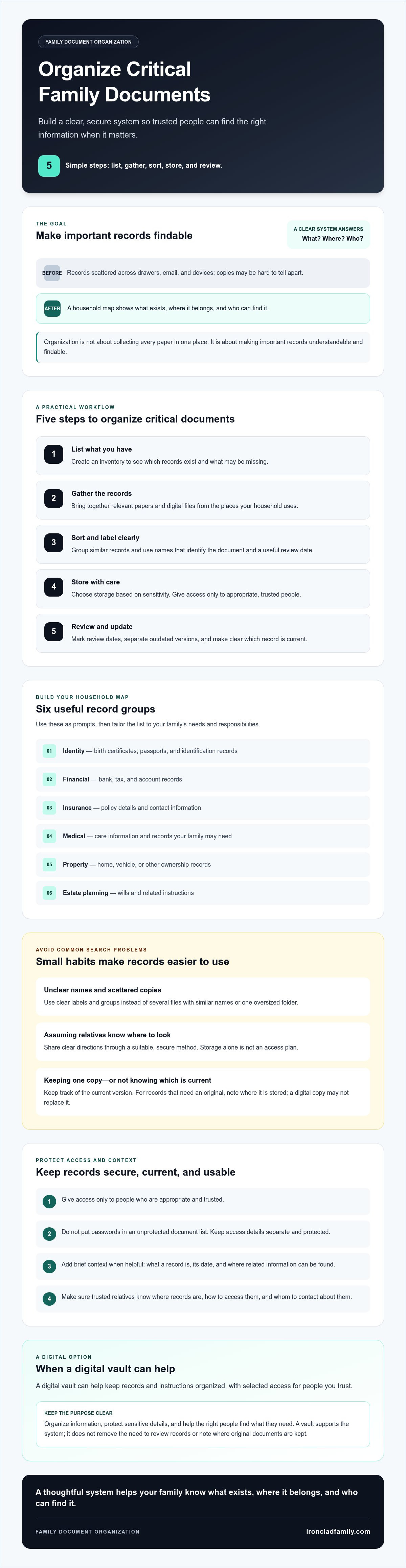
- Use five simple steps to organize critical documents: list, gather, sort, store, and review.
- Choose storage based on each record’s sensitivity, and give access only to appropriate, trusted people.
- A digital vault can help keep records and instructions organized, with selected access for people you trust.
Why Organizing Critical Documents Matters for Your Family
A family member needs an insurance record, medical detail, or property document. No one knows whether it’s in a filing cabinet, an email account, or someone else’s device. Taking time to organize critical documents gives your family a clear way to understand what exists, where it belongs, and who can find it.
Scattered records can slow practical decisions. Outdated information can create confusion, and a document without context may be difficult to use. Organization isn’t about collecting every paper in one place. It’s about making important records understandable and findable by the people who may need them.
For a helpful overview of preparing important records, watch this video:
What counts as a critical family document?
Start with categories that fit your household. These are useful prompts, not a complete list or legal requirement:
- Identity: birth certificates, passports, and identification records.
- Financial: bank, tax, and account records.
- Insurance: policy details and contact information.
- Medical: care information and records your family may need.
- Property: home, vehicle, or other ownership records.
- Estate planning: wills and related instructions.
Include records that reflect your family’s needs and responsibilities. A caregiver, homeowner, or parent may need to account for different documents. The aim is a useful household map, not a pile of paperwork for its own sake.
What can happen when records are hard to find?
If a trusted relative needs information, they may not know which file is current or how it relates to the situation. A policy without the insurer’s contact details, for example, may take extra effort to use. A short note naming the document, its date, and where to find related information can provide helpful context.
Families can build this system themselves. Financial advisors, real estate agents, and estate planners can also help clients identify useful record categories and discuss how to keep information organized. This practical approach reflects records management, the organized handling of records over time. The goal is calm readiness: the right people can locate the information, understand what it is, and know what step to take next.
Common Mistakes That Make Critical Documents Hard to Find
Records can be hard to locate even when a family has kept them. One person may save a scan in email, another may keep a paper copy in a desk, and a third may store a related file on a phone. Without a clear system, relatives may not know where to begin or which copy to trust.
Scattered copies and unclear labels
Saving several files with names like “insurance,” “insurance new,” and “insurance final” creates a guessing game. Use labels that identify the document and include a useful date, such as “Home insurance policy, reviewed May 2026.” Choose a format that makes sense to your household. It’s a helpful practice, not a legal or security standard.
Putting every record into one large folder doesn’t solve the problem if there are no clear labels or groups. A simple structure can help people narrow their search, with categories such as identity, finances, health, property, and estate planning. The National Institute on Aging offers a checklist for important documents that can help families decide what information to gather.
Assuming relatives know where records are
A spouse or adult child may know that a folder exists but not where it’s stored, how to open it, or whom to contact about its contents. Storage alone isn’t an access plan. Identify the trusted people who may need information, then share clear directions through a suitable, secure method. Don’t put passwords in an unprotected document list. Keep access details separate and protected.
Relying on one copy or an old version
A single copy may be difficult to reach if it’s kept on a device that’s lost, damaged, or unavailable. Multiple copies can create a different problem if no one can tell which one is current. Mark review dates, separate outdated versions, and note where the current record can be found. For records that need an original, record its location rather than assuming a digital copy replaces it.
These habits can prevent common search problems and give trusted relatives a clearer starting point. The next step is to build a simple system for listing, sorting, and reviewing the records your household may need.
How to Organize Critical Documents in Five Practical Steps
Begin with an inventory, not a stack of papers to move. Record what your household has and where each original or copy is kept. This gives you a clear picture before deciding what to sort or store.
- List: Note each record, its category, and its location. Mark whether it’s an original or a copy.
- Gather: Check paper files, email, devices, and relevant online accounts. Add each record to your inventory as you find it.
- Sort: Group records by purpose, such as finances, health, property, and estate planning. Set aside expired, duplicate, or uncertain copies for review.
- Store: Choose an appropriate location for each group. Create a simple index with plain labels and the location of the current record.
- Review: Set a recurring reminder to check whether records and access details are current. Update the index when anything changes.
Gather and sort records into useful groups
Work through one source at a time, such as a filing cabinet, email account, or device. This keeps the task manageable and helps you avoid overlooking records. For financial files, Michigan State University Extension offers practical guidance on how to organize your financial records.
Keep uncertain or older copies separate until you can confirm whether they’re still useful. Don’t assume a file is outdated just because its name or date is unclear. Note the question in your inventory and follow up with the person or organization that can clarify it.
Create a simple index and review routine
Use labels relatives can understand, such as “Property records, current copy” or “Will, signed original location.” Review your index on a recurring schedule and after changes that affect your records. Advisors can guide clients in creating an inventory of document types and locations without collecting private records they don’t need.
This five-step process helps you organize critical documents and keep the system useful. Start with the inventory, then build on it as your family’s records change.
Keep Critical Documents Secure, Current, and Accessible
A useful document system balances three needs: protection, accuracy, and access. The right storage choice depends on how sensitive a record is and what works for your household. A labeled file cabinet may suit paper originals, while protected digital storage can make copies easier to find. Neither choice guarantees that a record can never be lost, misused, or accessed by the wrong person.
Choose storage that fits the record
Keep paper records in a consistent, clearly labeled place that appropriate family members can locate. Digital copies can help someone review information when they’re away from home, but a copy doesn’t automatically replace a signed original or another required version. If a record needs an original, note where it is kept and how a trusted person can find it.
Consider whether important records have a backup and whether the people who may need them can reach the storage method. Keep access instructions protected, and avoid placing sensitive details in a file that anyone who can view the index can open. The goal is clear, limited access, not broad sharing.
Plan for trusted access and updates
Tell the right people that the system exists and explain how to locate the records relevant to them. You don’t need to share every private detail with every relative. Choose people based on their roles and responsibilities, and review access if those responsibilities or family circumstances change.
Make document checks part of your routine. Confirm that key records are current, the index points to the right location, and any access instructions still work. Review the system after a major change, such as a move, a new account, or an update to an estate-planning document. For broader readiness planning, use a family emergency plan checklist alongside your document inventory.
To organize critical documents well, include security and access in the same plan. A digital vault is one option for keeping digital records and instructions together while planning access for trusted people. Explore a secure digital vault for families as you consider which storage approach fits your household.
When a Digital Vault Can Help Organize Family Documents
A digital vault is a protected place to organize digital records and instructions. It can support the system you’ve already built by keeping files in clear groups, using understandable labels, and helping you plan who should have access. It doesn’t replace your inventory or review routine. It gives important digital information a defined home.
For example, a family might group insurance details, property records, and estate-planning documents separately, then label each file by type and date. A simple index can point a trusted person to the right group without requiring them to search through every file. You don’t need to store everything in one place automatically. Choose records for the vault based on your family’s needs and the sensitivity of the information.
What to look for in a family digital vault
Consider whether a vault offers privacy protections suited to the records you plan to store, a straightforward way to organize files, and a way to plan access for trusted people. Ask how access works and how to update it. If a provider describes its system as using zero-knowledge encryption, that generally means the service is designed so it can’t read the stored information in the usual way. Review the provider’s explanation before deciding if it suits your needs.
A digital vault can make copies and instructions easier to locate, but it doesn’t replace legal advice, a physical original, or every household’s chosen storage method. Keep noting where originals are held, and check that each digital record is current. A secure system still needs clear instructions and regular care.
How IronClad Family fits into a document plan
IronClad Family offers The Vault, a digital platform for families to organize and protect documents and digital assets. The Vault uses zero-knowledge encryption to keep sensitive information private and accessible only to users and their chosen recipients. It also supports automated delivery of selected instructions and credentials to loved ones during emergencies or after a person’s passing. Families can consider it as one option for organizing digital records and planning trusted access while keeping their own inventory and update routine in place.
A vault is most useful when it supports a plan people understand. Decide what belongs there, use labels that make sense to your family, and make sure the right trusted people know how to find relevant information. Then review your records and access choices as circumstances change.
Explore how a secure digital vault can help protect your family’s important documents.
Make Your Family’s Records Easier to Find
A clear system helps your family know what records exist, where to find them, and who can access them. Start with an inventory, use simple labels, and review the system as your family’s needs change. These steady steps make it easier to organize critical documents and keep them useful over time.
Choose storage that fits each record, and make sure trusted people know how to find what they may need. Learn how The Vault can help your family organize and protect digital records.
Frequently Asked Questions
Which documents should I organize first?
Start with records your household may need for everyday decisions or urgent tasks. These might include identification, insurance details, medical information, financial account records, property papers, and estate-planning documents. Then consider what matters for your family’s specific needs, such as caregiving or home ownership. This is a useful starting point, not a complete or legally required list. Add records based on your household’s responsibilities.
How should I organize important documents at home?
Begin with an inventory before moving papers or files. Record what you have and where each original or copy is kept. Group documents by purpose, such as finances, health, property, and estate planning, then use plain labels that show the document type and relevant date. Keep a simple index so relatives can find categories quickly. Review the index and records regularly, updating it when information or locations change.
Is it safe to store critical documents digitally?
It depends on the storage method and how access is managed. Choose a service or device with privacy and security protections suited to the sensitivity of the records. Use clear access instructions, and share them only with appropriate, trusted people. Avoid putting passwords in an unprotected document list. Digital storage can make records easier to find, but no method can guarantee that information will never be lost, misused, or accessed improperly.
Can my family access my documents if I cannot?
They may be able to if you plan access in advance. Identify which trusted people may need specific records, tell them the system exists, and explain how to find relevant information. Keep instructions clear and share sensitive access details through a suitable, protected method. Review the plan when family responsibilities or circumstances change. Don’t assume that relatives know where records are or can open accounts simply because they’re family members.
How often should I review important family documents?
Set a regular review time, such as once a year, and check sooner after a major change. A move, new account, change in caregiving needs, or updated estate-planning document may affect what your family needs to find. Confirm that key records are current, the index shows the right location, and trusted people still have suitable access. A recurring reminder makes updates part of your family’s routine instead of a one-time task.
Should I keep original documents or digital copies?
Keep originals when they matter, and use digital copies to support access and organization. A digital copy may help a family member review details, but it doesn’t automatically replace an original or another version that may be needed. Note where important originals are stored and include that location in your index. Keep copies clearly labeled, and check them against the current record so relatives can tell which version to use.
