

- 12 mins
A client’s meeting notes may be easy to find while their family’s essential records remain scattered across tools. Comparing wealthbox integrated digital vault options for financial planners starts with understanding how relationship work and protected document organization can support each other.
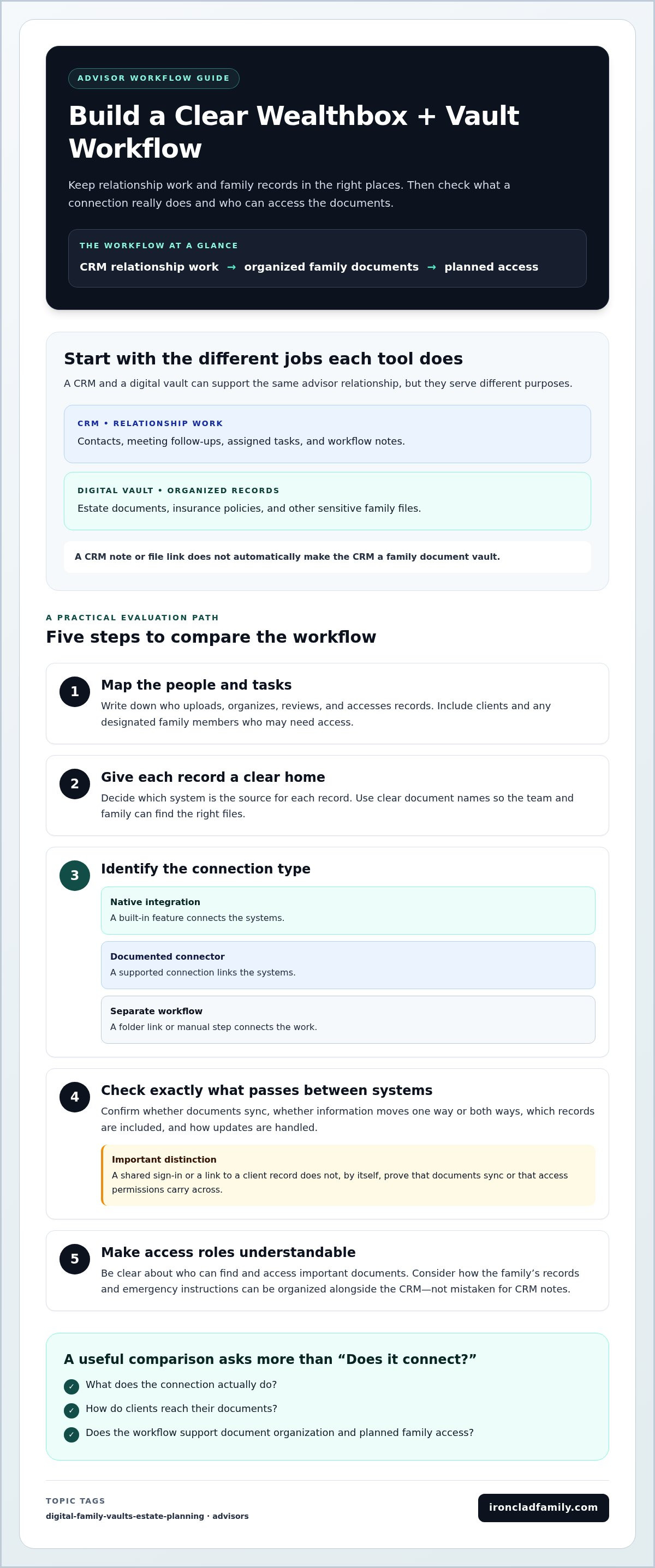
Advisor workflow: CRM relationship work organized family documents planned access
A connection between tools can mean anything from a folder link to a supported data exchange. The distinction matters. A practical setup should make it clear where records belong and how clients or designated family members can find them.
This comparison looks at connection types, client access, document organization, privacy, and workflow needs so you can choose a sensible next step for your firm.
Key Takeaways
- Separate CRM tasks and client notes from the secure storage and family access needs a document vault is designed to support.
- Compare wealthbox integrated digital vault options for financial planners by the type of connection, client access, document organization, and emergency planning they support.
- Map your current document workflow first, then decide which records belong in a vault and who should be able to access them.
- Distinguish a direct connection from a linked folder or a separate vault workflow so your team knows where to find client records.
- Consider how a dedicated vault and planned emergency access can help families keep important instructions and documents organized.
What Wealthbox and a digital vault each do for financial planners
A client’s meeting notes may be in one system while their will, insurance details, or emergency instructions sit somewhere else. That split can make it harder to see both the relationship context and the family records that may matter during a major life event. Comparing wealthbox integrated digital vault options for financial planners starts with knowing what each tool is meant to do.
Wealthbox is a CRM workspace for managing client relationships, contacts, tasks, and practice workflows. A digital vault serves a different purpose: it organizes and protects important client and family documents. The tools can work alongside each other, but using both doesn’t automatically mean they’re natively integrated.
A short product walkthrough can illustrate one kind of connected workflow. Treat the video as an example, not proof of a connection between any particular vault and Wealthbox.
What belongs in a CRM and what belongs in a digital vault?
A CRM holds the working context of an advisor relationship: contact details, meeting follow-ups, assigned tasks, and workflow notes. A vault is for organized records such as estate documents, insurance policies, and other sensitive family files. In short: CRM data helps an advisor manage the relationship; vaulted documents help a client organize and protect important records. Some records may relate to both, but their purposes remain distinct.
What does an integrated digital vault mean?
A native integration connects systems through a built-in feature. A documented connector links them through a supported connection. A separate workflow may simply use a folder link or another manual step. These are different levels of connection. A shared sign-in or a link to a client record doesn’t, by itself, mean documents sync, updates flow both ways, or access permissions carry across systems.
This distinction matters for family readiness, too. Digital inheritance planning includes the practical challenge of organizing digital assets and preparing for future access. A dedicated vault can provide a document-organizing approach alongside a CRM, without making the CRM itself the family’s document repository.
The comparison ahead looks at CRM-based file handling, dedicated client vaults, and broader operations platforms. It focuses on product role, connection evidence, client access, document organization, and emergency planning, without assuming that any option has a specific Wealthbox connection.
Why Wealthbox-based planners need to avoid common vault assumptions
A document can be stored and still be hard to find when it’s needed. If client records sit in CRM attachments, shared folders, email threads, and a separate vault, staff may lose time locating the right version or understanding who can access it. Families may face a similar problem when important instructions are stored without a clear plan for who should find them.
CRM notes and document storage support related work, but they aren’t interchangeable. Notes can tell an advisor what follow-up is due; they don’t necessarily provide an organized home for sensitive family records or a way for designated people to access instructions. The SEC cybersecurity guidance discusses steps investment advisers should consider when addressing cybersecurity risks. It’s a reminder to assess how client information is handled, not a guarantee that any one tool meets a firm’s needs.
Common mistakes when comparing CRM-connected vaults
Three assumptions can lead to a poor fit:
- Confusing a link or attachment with a vault. A CRM record may point to a file, but that doesn’t necessarily provide structured document categories, family access, or a complete vault workflow.
- Treating a marketplace listing as proof of syncing. A listed connection doesn’t by itself show whether documents sync one way or both ways, which records move, or how updates are handled.
- Choosing features before mapping the work. A firm needs to understand who uploads, organizes, reviews, and accesses records before deciding which functions matter.
For wealthbox integrated digital vault options for financial planners, the useful question isn’t simply whether two products connect. It’s what the connection actually does, and whether it supports the way advisors and clients handle documents.
What can go wrong when document continuity is overlooked?
If staff can’t quickly locate a current policy or client document, routine preparation may slow down while they search across tools or ask for the same information again. A family may also know that instructions exist but not know where they’re stored or who has permission to access them. That can leave important details out of reach during a stressful transition.
Set a simple process: decide which system is the source for each record, use clear document names, and make access roles understandable to clients and designated recipients. This helps keep family records easier to locate without confusing the CRM’s role with the vault’s.
Compare Wealthbox digital vault options by integration and client workflow
The best fit depends on more than whether a tool says it “integrates.” Compare what it stores, how clients reach their documents, and what the connection actually passes between systems. The table separates common tool types from connection details that need clear documentation.
| Option | Product role | Wealthbox connection | Client access and organization | Emergency planning |
|---|---|---|---|---|
| CRM-native files and linked storage | Keeps client records and related files close to CRM work. Wealthbox also offers basic file storage and native connections with Box, Dropbox, and Google Drive, according to its product information. | Connection depends on the storage option. A link to a folder is different from file syncing. | Useful for staff who want documents near client records. Client access and family-focused organization depend on the storage service and setup. | Don’t assume family access or emergency delivery is included. |
| Dedicated client vault | Centers on protected, organized client and family documents. | Check current documentation for a native connection, supported connector, or separate workflow. Don’t assume a Wealthbox connection. | May provide a client-facing place for records; organization and access controls vary by tool. | Look for a stated process for designated recipients and essential instructions. |
| Broader operations platform | Supports wider firm processes, such as document handling and workflow management. | Connections may use built-in links, APIs, or separate steps. Confirm what is supported. | Can suit firm-wide administration, but consider whether the client experience is clear and simple. | Confirm whether family emergency access is part of the workflow or handled elsewhere. |
Native connection, API connection, or separate workflow?
A native connection is built into the products. A documented connector is a supported link between them. An API connection uses a defined way for software to exchange information, often through a custom setup. A separate workflow might mean staff open a vault independently or follow a folder link from a CRM record.
Before relying on a connection, look for documentation that explains which records are supported, whether information moves one way or both ways, and how changes or permissions are handled. Compare documented workflows, not the word “integrated” alone.
Which vault category fits different advisory firms?
A firm focused on secure client document access may prefer a dedicated vault category. A firm coordinating many internal processes may need a broader operations platform. In either case, weigh staff administration against the family’s experience: clients should be able to understand where records belong and how intended recipients can access essential information. Those distinctions help make wealthbox integrated digital vault options for financial planners easier to assess without assuming a connection that hasn’t been documented.
How financial planners can evaluate Wealthbox vault options
Start with the work your firm already does. A clear picture of how documents move through your practice will help you compare wealthbox integrated digital vault options for financial planners based on real client and staff needs, not a feature list alone.
Map the client document journey before comparing products
Trace each step: how a document is collected, where it’s organized, who can access it, and how someone will find it later. Keep CRM tasks, long-term document storage, and emergency instructions distinct. They may support the same client relationship, but each serves a different purpose.
Identify the people involved, too. Consider which staff members handle uploads or updates, which clients need access, and whether a family member or other designated recipient should receive essential instructions. Access should fit the person’s role and the reason they need the record.
Use a practical checklist for feature comparisons
Use this short process to turn your map into a useful comparison:
- 1. List current record types. Note which documents belong in the CRM, which need an organized vault, and which instructions may be needed during an emergency.
- 2. Name the users and their tasks. Record who adds, updates, reviews, and retrieves documents. Include the client experience, not just staff administration.
- 3. Compare access and organization. Look at user permissions, document categories, sharing steps, and how clients can locate records without extra confusion.
- 4. Review the stated privacy approach. Compare the product’s documented security features and how access is managed. Keep claims tied to described capabilities rather than broad promises.
- 5. Separate connection claims from workflow needs. Record whether a connection is documented, what information it supports, and how it works. Then note separately what your firm needs to happen day to day.
A tool can connect neatly to staff processes yet still feel difficult for clients. Walk through a familiar task from both sides: a staff member locating a record, then a client adding or finding a document. This simple test can reveal extra steps and unclear handoffs before they become part of routine work.
For another advisor-focused perspective, see the Advisor Digital Vault Guide.
Ready to explore a vault workflow designed for advisors and family document continuity? Explore IronClad Family’s digital vault approach.
Where IronClad Family’s digital vault fits in an advisor workflow
After comparing tool types and mapping your firm’s needs, consider whether a dedicated vault could fill the family-document role in your workflow. IronClad Family offers The Vault for organizing protected records and an Advisor Portal that supports branded vault services and client document management. These tools address document preparedness alongside an advisor’s relationship-management work. They shouldn’t be treated as proof of a Wealthbox connection.
How a dedicated vault can complement CRM work
An Advisor Portal can give a firm a way to manage client documents and offer vault services under its brand. The Vault uses zero-knowledge encryption, a privacy approach designed to limit the service provider’s ability to view stored information. It’s a security design, not a promise that any system is completely secure.
The distinction in daily use is straightforward: a CRM can support relationship context, tasks, and practice workflows, while a vault focuses on organized family records and preparedness. They can complement each other without syncing. For example, an advisor may manage follow-up in the CRM while a family uses a vault to organize important documents and prepare essential instructions for designated recipients. Keep the source of each record and the steps for accessing it clear.
For details about the digital vault platform for advisors, review how its portal supports branded vault services and client document management.
A calm next step for planners comparing options
Use the same practical criteria for every option: clear roles for CRM and vault, access that clients and intended recipients can understand, a stated privacy approach, and documented details about any connection. If a connection matters, identify what information it supports and how it works. Keep that evidence separate from assumptions about the workflow.
A dedicated vault may help extend document organization beyond the advisor’s routine tasks, supporting continuity for a family’s important records and instructions. Explore ways to protect important documents as part of a clear client document plan.
See how advisors use digital vaults to strengthen client relationships.
Build a clearer path for client documents
The right digital vault approach starts with clear roles. Wealthbox can support relationship workflows, while a dedicated vault helps organize sensitive family records and plan access to essential instructions. For wealthbox integrated digital vault options for financial planners, compare the documented connection and the real client workflow, not just a feature label.
IronClad Family’s Advisor Portal supports branded vault services and client document management. The Vault uses zero-knowledge encryption, a privacy approach designed to limit the service provider’s ability to view stored information. Emergency access features can deliver essential instructions and credentials to designated recipients. These capabilities can support family preparedness alongside an advisor relationship, without assuming Wealthbox synchronization.
Start with your firm’s document journey, then weigh clear access roles, client usability, privacy features, and continuity needs. Explore IronClad Family’s digital vault approach to consider how organized records could fit your advisory workflow.
See how advisors use digital vaults to strengthen client relationships: See how advisors use digital vaults to strengthen client relationships. A thoughtful setup can make important records easier to organize and help families feel more prepared for what lies ahead.
Frequently Asked Questions
Does Wealthbox include a digital vault for client documents?
Wealthbox includes basic file storage, but that isn’t automatically the same as a dedicated digital vault. Wealthbox offers Wealthbox Cloud, and its product information also identifies connections with Box, Dropbox, and Google Drive. These options can keep files near CRM workflows, while a dedicated vault focuses on protected family records and planned access. Review each tool’s purpose and access model before treating it as a complete vault approach.
Can a financial planner connect a digital vault to Wealthbox?
A planner may connect systems through a documented connector, an API-based setup, or a simple link, depending on the products and supported workflow. Don’t assume a vault syncs with Wealthbox just because both are used by the firm or appear in an integration listing. Look for clear documentation on which records move, the direction of updates, and whether permissions and client access carry across systems.
What is the difference between a Wealthbox CRM and a digital vault?
Wealthbox is a CRM for managing client relationships, contacts, tasks, and practice workflows. A digital vault is designed to organize and protect important documents, such as family records and estate planning documents. A CRM can help an advisor track a follow-up; a vault can give records a structured home. The tools can support the same client relationship without serving the same purpose.
How should advisors compare integrated digital vault options?
To compare wealthbox integrated digital vault options for financial planners, start with the firm’s document workflow. Assess connection evidence, what information moves between systems, client access, document organization, and the stated privacy approach. Also consider how staff manage records and how clients or designated recipients find them. A clear workflow matters more than an “integrated” label without details about what the connection does.
Is a separate client vault useful if an advisory firm already uses Wealthbox?
Yes, a separate client vault can serve a different need from a CRM. Wealthbox may support relationship workflows and basic file handling, while a dedicated vault can help families organize important documents and plan who may access essential instructions. The value depends on the firm’s workflow and client needs. Keep clear which system is the home for each record, so staff and clients know where to look.
What documents should financial planners help clients organize in a digital vault?
Useful records may include wills, insurance documents, financial account information, property records, and essential instructions for family members. The right set depends on each household. Help clients group records by topic and note where current versions belong. If emergency access matters, they can also organize instructions and credentials for designated recipients. Keep sensitive information in an appropriate protected system, not scattered across routine notes.
How does zero-knowledge encryption work in a digital vault?
Zero-knowledge encryption is a privacy approach designed so the service provider can’t read a user’s stored information in its normal form. The user and chosen recipients are the intended people who can access it. The exact design depends on the service, so the phrase alone isn’t a guarantee of complete security. Review how access is controlled and how the provider describes its encryption before choosing a vault.
