

- 11 mins
What if your family can find your recovery details but still doesn’t know what to do with them? The 1Password emergency kit vs automated posthumous delivery vault comparison comes down to the difference between saved access information and a planned way to share selected details.
It’s natural to want loved ones to have what they need while keeping private information protected. A clear plan can help you decide what should be available during incapacity, what may be shared after death, and who should receive it.
This guide compares the two approaches and offers practical steps for organizing information, writing instructions, and reviewing your plan as family needs change.
Key Takeaways
- Decide which records and credentials loved ones may need during an emergency and which should be shared later.
- Understand how the 1Password emergency kit vs automated posthumous delivery vault differs in storing, accessing, and sharing information.
- Give trusted recipients clear instructions so they know what to do with recovery details.
- Review credentials and recipient information when accounts or family needs change.
- Consider whether a secure digital vault can help organize important records and planned access.
Why the 1Password Emergency Kit vs. an Automated Delivery Vault Matters
If a family member becomes unable to share account details, loved ones may not know where important records are or how to use them. Planning ahead means deciding what information to preserve, who should receive it, and when. That distinction is central to the 1Password emergency kit vs automated posthumous delivery vault comparison.
A 1Password Emergency Kit is a document for manually recovering access to an account. Automated delivery, by contrast, is a plan for sharing selected information with chosen recipients after a qualifying event. Saving access details and planning their delivery are different tasks.
For a visual overview of 1Password and its Emergency Kit, watch this tutorial:
What does an emergency kit help you preserve?
The 1Password Emergency Kit is a PDF with account sign-in details, including the sign-in address, email, and Secret Key. It also has a space to write the account password. These details support manual account recovery, such as when you’ve forgotten your password or can’t sign in.
Keeping the document safe matters, but it doesn’t create a handoff plan. It doesn’t name who should receive it, explain when they should use it, or automatically transfer credentials after death. Those decisions need a separate plan and clear instructions for trusted people.
What does posthumous delivery add to the plan?
A delivery plan lets you prepare selected information for chosen recipients in advance. This may include credentials, instructions, or records. The plan determines how information is shared; the contents are what loved ones may need to act on your wishes.
This is one part of digital inheritance, the planning involved in passing on access to digital information and assets. Start by deciding what should be available during incapacity and what should be shared after death. Describe the purpose of each item and who it is for.
A digital vault can bring records and instructions together with a plan for future access. For example, a secure digital vault for families can help organize important documents alongside planned access. The aim is to give loved ones a clear path without confusing a stored recovery document with a delivery process.
How 1Password Emergency Kits and Automated Vault Delivery Differ
The key difference is what each approach does. A 1Password Emergency Kit supports manual account recovery. An automated vault delivery plan is designed to share selected information with chosen recipients after a qualifying event. To compare them, first identify which access needs you’re planning for.
Purpose
Emergency Kit: Provides details for manually recovering access to a 1Password account.
Automated delivery: Plans how selected information may be shared with recipients in the future.
Access planning
Emergency Kit: The document itself doesn’t set out a delivery plan.
Automated delivery: Connects selected information to a planned sharing process. Exact features vary by service.
Recipient role
Emergency Kit: A trusted person would need to get the document and use its information, if they are meant to access the account.
Automated delivery: The plan identifies recipients for the selected information. Specific recipient steps depend on the service.
What to verify
Emergency Kit: Check current 1Password guidance for the document’s contents and recovery use.
Automated delivery: Review current documentation for how access is planned and what information can be shared.
Storage, access, and timing are separate questions
1Password describes its Emergency Kit as a PDF containing the sign-in address, email, and Secret Key, with space to write the account password. It’s for manual account recovery, not automatic release after death. Check current official documentation before relying on any tool, especially when comparing features beyond the Emergency Kit.
A secure place to store information is not the same as a plan to deliver it.
Which approach fits a family’s access needs?
Start by listing what loved ones may need: instructions for finding records, account credentials, important documents, or a combination. Then name the intended recipients and explain what each item is for. Share only the information each recipient needs.
IronClad Family’s The Vault combines private storage using zero-knowledge encryption with automated delivery features for essential instructions and credentials during emergencies or after a person’s passing. The delivery plan and its contents work together to help organize future access. Compare the plan with your family’s needs as you decide how to organize records.
Common Mistakes When Planning Password and Digital Inheritance
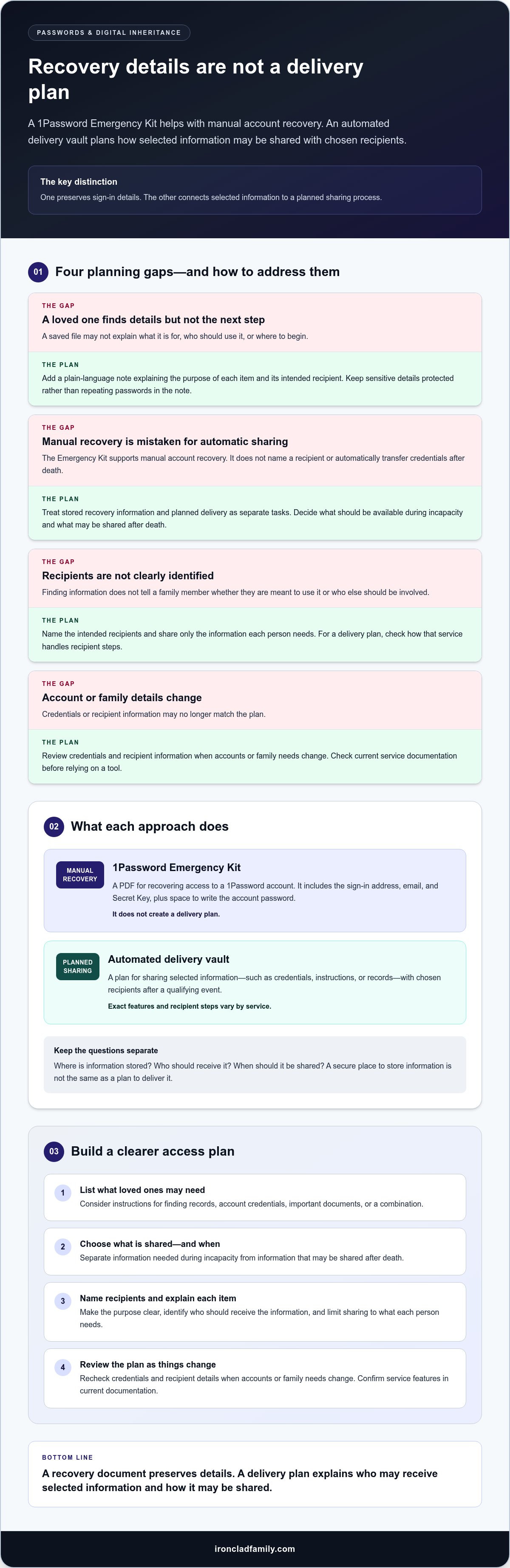
A saved recovery document can feel like a complete backup. But if a loved one can’t tell what it’s for, where to begin, or whether they’re meant to use it, the plan may leave them with more questions than answers. The 1Password emergency kit vs automated posthumous delivery vault comparison shows why storing information and preparing people to use it are separate tasks.
Why a saved file is not a complete family plan
Possessing a file doesn’t explain the next step. A relative might find an Emergency Kit but not know which account it relates to, whether its details are current, or who else should be involved. Add a plain-language note that explains the information’s purpose and intended recipient. Keep sensitive details protected rather than repeating passwords in the note.
A file alone can’t guarantee that someone will be able to access an account. Access may depend on accurate information and the service’s recovery process. Treat instructions as a guide, not a promise of access.
How to balance privacy with future access
Sharing too broadly can expose private details before they’re needed. Sharing too narrowly, or without clear directions, can leave loved ones unsure where to turn. Choose recipients carefully, state what information each person is meant to receive, and explain its purpose without sharing more than they need to know in advance.
No plan removes every risk. Consider privacy and continuity together: what should remain private, who may need access, and under what circumstances should information be shared? Use a tool’s documented release controls and safeguards to understand how they work.
Plans can become stale. An account password may change, a recovery detail may no longer work, or a recipient’s contact information may be out of date. Family needs and relationships can change, too. Update the information and instructions when these details change.
- Unclear purpose: Label what a record or credential is for, using plain language.
- Old details: Review saved account and recovery information after changes.
- Unclear recipients: Name who each item is intended for and explain their role.
- Too much shared too soon: Separate private information from instructions about where to find it.
These are practical organization steps, not legal conclusions. A thoughtful plan gives loved ones a clear starting point while respecting the privacy of the records being protected.
Practical Steps to Choose and Maintain an Access Plan
A useful plan starts with a simple question: what would your loved ones need if you couldn’t guide them? Comparing a 1Password emergency kit vs automated posthumous delivery vault is easier when you sort information by purpose and timing.
- 1. List critical information. Note the accounts, documents, and instructions your family may need. Record where each item is organized, but don’t repeat passwords or other sensitive details in a general instruction note.
- 2. Separate access needs. Decide what someone may need during incapacity and what should be available after death. Consider which information is essential for each situation.
- 3. Choose recipients. Name the person or people intended to receive each type of information. Consider who can follow the instructions and who may need a different role.
- 4. Write plain-language instructions. Explain where information is organized, what it relates to, and why it may matter. Make the next step clear without exposing credentials in the instructions.
- 5. Review the plan. Revisit stored details and recipient choices after major account or family changes. Check current product documentation for recovery steps, access conditions, and security details.
Build a plan recipients can understand
Imagine a family member opening your instructions without you there to explain them. Could they tell which records matter, who they’re intended for, and where to begin? Use everyday language and keep directions together with a clear list of what is stored. For broader preparedness, consult the “Family Emergency Plan Checklist” alongside your digital access plan.
Financial advisors, estate planners, and other professionals can use these steps to guide client conversations about document organization and intended access. Keep the discussion focused on the client’s choices and practical planning, not legal or financial advice.
Review access details as life changes
Revisit the plan when accounts change, family needs shift, or a named recipient is no longer the right person. Write down who should receive which information and why. Then review the service’s current guidance so your notes reflect its recovery process and access conditions.
A clear, organized plan can help relatives know where to start. Explore how a digital vault can organize family records as part of your access plan.
When a Digital Vault with Automated Delivery May Fit
A digital vault may suit families who want important documents, digital asset details, and instructions organized alongside a plan for future access. It can bring records together while keeping storage and delivery as distinct parts of the plan. In the 1Password emergency kit vs automated posthumous delivery vault comparison, consider whether your family needs recovery details, planned sharing, or both.
What to look for in a family digital vault
Consider secure organization, recipient planning, clear instructions, and future access as separate needs. A vault can help store records, but you still need to decide who should receive each item and understand how access works.
Zero-knowledge encryption is designed to keep stored information private from the service provider. It supports privacy, but no security approach removes every risk. Review the tool’s documentation to understand its access, recovery, and delivery process. The secure digital vault estate-planning guide can help you consider how organized records fit into a broader family plan.
How The Vault fits the comparison
The Vault combines private storage with automated delivery features for essential instructions and credentials during emergencies or after a person’s passing. It uses zero-knowledge encryption, designed to keep sensitive information private. Encryption supports privacy while information is stored, while delivery features support planned access. Consider both functions as you decide what to organize and share.
Explore a secure digital vault for families.
Learn how to protect your family’s most important documents with a secure digital vault.
Make Your Family’s Access Plan Clear
The 1Password emergency kit vs automated posthumous delivery vault comparison comes down to two needs: keeping recovery details available and planning how selected information reaches loved ones. An Emergency Kit supports manual account recovery, while an automated delivery vault can help organize information for planned emergency or posthumous access.
A useful plan also needs clear instructions, named recipients, and current details. Think about what family members may need during incapacity and what should be shared after death. Review your choices as accounts and family needs change.
The Vault combines organized storage with automated delivery features for emergencies or after a person’s passing. Its zero-knowledge encryption is designed to keep sensitive information private. Choose the approach that fits your family’s access needs and privacy concerns.
A thoughtful plan can give loved ones a clearer path forward. Learn how to protect your family’s most important documents with a secure digital vault. Learn how to protect your family’s most important documents with a secure digital vault.
Frequently Asked Questions
Is a 1Password Emergency Kit the same as a posthumous delivery vault?
No. A 1Password Emergency Kit is a PDF with account details intended to help with manual account recovery. A posthumous delivery vault is designed to organize selected information and plan how it may be shared with chosen recipients after a qualifying event. One preserves recovery details; the other adds a delivery process. Consider whether your family needs one or both.
Can a 1Password Emergency Kit automatically give my family access after I die?
No. The Emergency Kit doesn’t automatically send account information or grant access after your death. It contains details someone would need to use manually, including the Secret Key and space to write the account password. If you intend a loved one to use it, make a separate plan for where it’s kept, who can find it, and what steps they should take. Check current 1Password guidance for recovery details.
What happens if my family cannot find my emergency kit?
If your family can’t find the kit, they may not have the information it contains for manual account recovery. Keep your plan clear about where the document is stored and who should know how to locate it, while protecting sensitive details from unnecessary exposure. Review the service’s current official recovery guidance, too. Don’t assume a lost copy can be replaced or that another person can access the account without the required information.
How do I choose between an emergency kit and automated delivery?
Choose based on what your family needs and when. An Emergency Kit provides details for manual account recovery. Automated delivery is designed to share selected information with chosen recipients through a planned process. In the 1Password emergency kit vs automated posthumous delivery vault comparison, consider whether loved ones need credentials, records, instructions, or a mix. Then review the tool’s current access conditions, recovery steps, and security information.
Is automated posthumous delivery safe for family passwords?
It can support a planned way to share selected credentials, but no tool can remove every privacy or security risk. Consider which passwords truly need to be shared, who should receive them, and whether the service’s documented process fits your wishes. IronClad Family’s The Vault uses zero-knowledge encryption, designed to keep sensitive information private, and offers automated delivery features for emergency or posthumous access.
Can a digital vault store documents as well as passwords?
Yes. A digital vault can help organize important documents and digital assets alongside credentials and instructions. IronClad Family’s The Vault supports families and financial advisors in organizing important documents and digital assets. Bringing these records together can make it easier to create a clear access plan, but you still need to explain where information is organized, who it’s intended for, and what loved ones may need to do with it.
