

- 11 mins
The closest replacement for Lantern may not be another end-of-life planning app. Lantern’s standalone service was decommissioned in September 2024 after its acquisition by Wellthy, so families searching for lantern end of life planning alternatives now need to compare tools designed for different purposes.
It makes sense to want one clear place for important papers, digital account details, and instructions loved ones can find when they need them. But alternatives don’t all do the same job. Some focus on creating legal documents, while others help organize family records, manage passwords, or guide people through end-of-life tasks.
This guide compares the main types of options and explains what to check before choosing one, including document coverage, privacy, and how trusted people can access information. You’ll also find practical steps for organizing records and preparing the people who may need them. The goal is to help you choose an approach that fits your family, not just a familiar name.
Key Takeaways
- Choose a planning tool based on the task: creating documents, managing passwords, storing files, or organizing records for trusted recipients.
- Compare privacy protections and how family members can access essential information, not just the number of features.
- Use this guide to compare lantern end of life planning alternatives by purpose and fit for your family.
- Start by listing key records, deciding who may need them, and checking that your instructions are easy to find.
- A digital vault may help bring records and access plans together, but it doesn’t replace legal guidance or guarantee an outcome.
Why families look for Lantern end-of-life planning alternatives
A will can be in place, yet loved ones may still struggle to find the account details, care instructions, or family records they need. The issue is often not that information is missing. It’s that no one knows where it is or how to access it.
An end-of-life planning alternative is a different tool or process for preparing and organizing information for the future. Families searching for lantern end of life planning alternatives should know that Lantern’s standalone service was decommissioned in September 2024. Current options serve different needs, so don’t assume one tool will handle every part of planning.
For background on planning for future health care, see this overview of advance care planning. It provides context on planning ahead for care. Check what each planning tool actually provides, and seek appropriate guidance for questions about your own circumstances.
What families need to prepare beyond a will
Legal documents, such as a will or health care instructions, are only one part of a family’s records. Loved ones may also need to locate insurance details, financial records, account information, and personal instructions. A document’s existence doesn’t ensure someone can find it, understand what it covers, or access related accounts.
Planning for future care and organizing family records are connected, but they are separate tasks. A secure digital vault for estate planning is one way to bring important information together and plan how selected details may reach trusted people.
When it makes sense to compare planning tools
Compare tools if records are scattered across paper files, email, and online folders; family members aren’t sure who to contact; or information may be outdated. Some people mainly need help organizing records. Others need to prepare planning documents or seek professional advice. A tool focused on one task may not cover the rest.
Financial advisors and estate planners may also help families organize records. The comparison below focuses on broad tool categories and practical questions: what information each can hold, how access works, and what privacy protections to review. Features and terms vary, so check current details for any provider you are considering.
Common mistakes when comparing Lantern alternatives
A long feature list can look convincing but still leave a family’s main question unanswered: can the right person find the right information when it matters? Compare tools by purpose, privacy practices, and access process, not just by the number of features listed.
Services can change, close, or update their terms. Check current product information before relying on a feature, and confirm what is available to you.
Assuming one tool covers every planning need
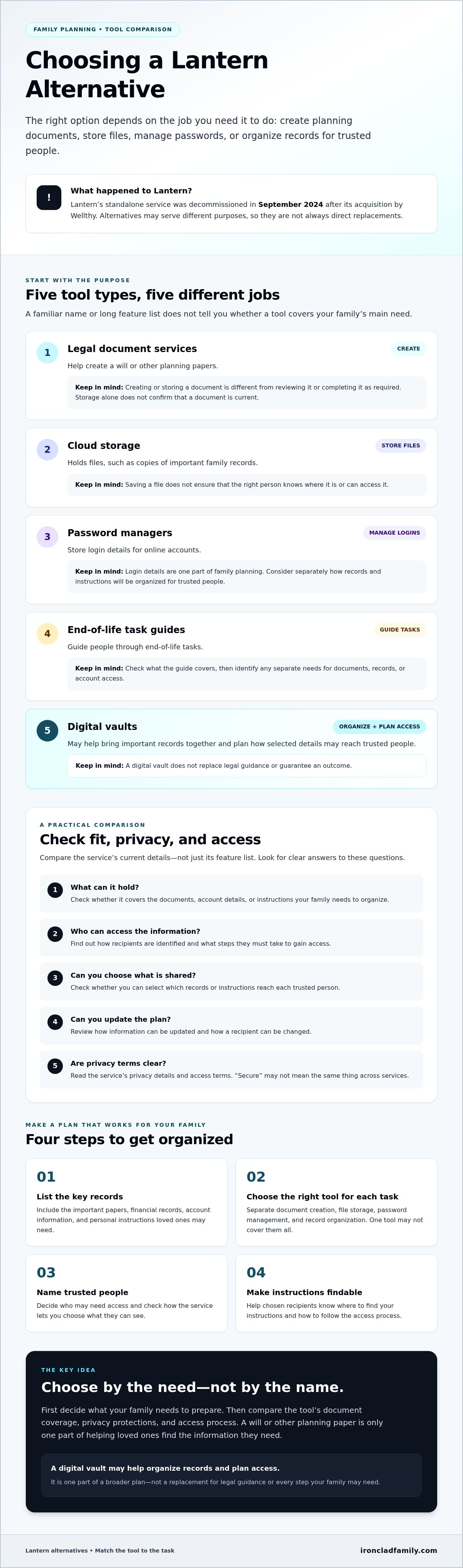
Planning involves separate tasks. A document service may help create a will or other planning papers. Cloud storage holds files, while a password manager stores login details. A digital vault may focus on organizing records and planning access for chosen recipients. These functions can overlap, but they aren’t interchangeable.
Saving a document is also different from creating, reviewing, or properly signing it. A scanned copy of a will may be easy to find, for example, but storage alone doesn’t confirm that the document is current or was completed as required. If you need legal guidance, consult an appropriate professional. No single tool should be assumed to replace legal advice or every step your family may need.
Overlooking privacy and loved ones’ access
Convenient storage isn’t enough if you haven’t considered who can see the information or how a trusted recipient would reach it. Before choosing a service, look for clear answers to questions such as:
- What information can be stored, and who can access it?
- How are recipients identified, and what steps must they take to gain access?
- Can you choose which records or instructions are shared?
- How can you update information or change a recipient?
Read the service’s privacy details and access terms rather than assuming that “secure” means the same thing everywhere. Avoid sharing sensitive details casually, but make sure chosen recipients know where to find your instructions and how to follow the access process. A plan no one can locate may not help your family.
As you compare lantern end of life planning alternatives, match each tool to a specific need, then note what remains uncovered. If organizing family records is a priority, you can review how a digital vault organizes records as one category of option. Check its access and privacy details just as you would for any service.
Lantern alternatives compared by the job they do
There isn’t one direct replacement for every planning task. Document-planning services, password managers, cloud storage, and digital vaults address different needs. Some families may use more than one. Treat the categories below as a starting point, then confirm each provider’s current features, terms, and availability before choosing.
| Solution category | Best-fit need | Limitations to consider | Questions to verify |
|---|---|---|---|
| Document-planning services | Preparing or organizing planning paperwork, such as wills or health care documents. | May not organize account details, passwords, or a wider set of family records. | What documents can you create or store? Does the service explain how to review or complete them? |
| Password managers | Keeping login credentials organized and available through the service’s access process. | Credentials are not the same as a complete family record system or legal planning documents. | Can you plan access for another person? What steps and limits apply? |
| General cloud storage | Saving and sharing digital files, such as copies of records. | File storage alone may not guide family organization or planned access after an emergency or death. | Who can view or share files? How are permissions changed, and what happens if account access is lost? |
| Digital vault platforms | Bringing important records and instructions together, with tools that may support planned access for chosen recipients. | Features, privacy protections, and access methods differ by platform. A vault does not itself create or validate every legal document. | What can you store? How is information protected? How do recipients gain access, and can you choose what they receive? |
Match the category to the job
Document-planning services focus on paperwork. Password managers focus on credentials. Cloud storage provides a place for files, while digital vault platforms may combine record organization with planned recipient access. These categories can complement one another, but don’t assume one service covers all four jobs.
For example, a family might use a document-planning service for paperwork and a separate tool to organize records and instructions. Check the details of any named service directly. Features and terms can change, and this comparison doesn’t confirm current offerings for individual providers.
A digital vault is one category to explore if organizing records and planning access are both priorities. IronClad Family’s The Vault is an example in this category. The company says it uses zero-knowledge encryption and supports automated delivery of selected instructions and credentials to designated recipients. Review the digital vault details and compare them with your family’s needs. Apply the same checks to any of the lantern end of life planning alternatives you consider.
How to choose and move to a Lantern alternative
A careful move starts with your family’s needs, not with uploading files. Use these steps to compare lantern end of life planning alternatives and build a plan trusted people can follow.
Build a short family comparison checklist
- 1. List your needs. Note whether you need to organize planning documents, account details, passwords, financial records, care wishes, or several types of information.
- 2. Sort your records. Make an inventory of what you have and where it is kept. Flag anything missing, outdated, or hard to locate.
- 3. Compare recipient access. Ask how the service identifies designated recipients, tells them what to do, and lets them reach the information. Check whether you can choose what each person receives.
- 4. Review privacy and terms. Look for clear details about who can access your information, how it is protected, what support is available, and how to update, export, or remove records. Confirm the provider’s actual process.
- 5. Revisit the plan. Check that records and recipient details remain accurate as family needs change.
Organize records before changing tools
Don’t move sensitive information into a new service before you understand its privacy terms and access steps. First, group records by purpose, such as identity, finances, insurance, health care, and online accounts. Note where original documents are kept and which details may need updating.
Choose trusted recipients and tell them where essential instructions can be found. You don’t need to share every private detail now, but recipients should know how to locate the plan and what steps to take. If you’re preparing for emergencies beyond document access, consider whether your family has a broader preparedness plan.
Before closing an old account or moving files, check whether information can be exported and what happens to it if you stop using the service. Keep a simple record of what you moved and where it now lives. Review the plan periodically so your family’s information stays useful and clear.
When a digital vault may be the right Lantern alternative
A digital vault may suit your family if important records and instructions are spread across paper files, email, and online folders, and you want a clearer way to organize them. It can bring selected information together and help you plan how trusted recipients may access it. It’s one category among the lantern end of life planning alternatives, not a complete replacement for every part of family planning.
A vault doesn’t provide legal representation, and storing a document doesn’t guarantee that it is current, valid, or suitable for your needs. It also can’t guarantee a particular outcome. For legal questions, speak with a qualified professional. Keep original papers where they need to be kept, and understand whether the vault stores digital copies, records, instructions, or other information.
What to look for in a family digital vault
Compare how each service helps organize records, explains its privacy protections, and plans access for chosen recipients. Check what information you control, how you can update it, and whether you can choose which instructions or records are shared. Ask how recipients are identified and what they must do to find the information. Don’t assume every digital vault offers the same protections or access process.
IronClad Family’s The Vault is one example in this category. The company says it uses zero-knowledge encryption and supports automated delivery of selected instructions and credentials to designated recipients during emergencies or after a person’s passing. Review any provider’s current terms and details before relying on a feature.
A calm next step for family preparedness
Start small. Make a short list of essential records, such as key financial information, care instructions, and account details. Note what’s missing or out of date, then decide who should know where the instructions are kept. Talk with those trusted family members so they understand their role and know how to locate the information if needed.
Learn how to protect your family’s most important documents with a secure digital vault.
Make your family’s next step clear
The right lantern end of life planning alternatives depend on what your family needs, from planning paperwork to organized records and planned access. Compare tools by their purpose, privacy details, and how trusted recipients can find important information.
Start with a short list of essential records and decide who should know where to find them. A digital vault may help organize that information. IronClad Family says The Vault uses zero-knowledge encryption and can automatically deliver selected instructions and credentials to designated recipients.
Taking one clear step now can make it easier for loved ones to find the information they need later.
Learn how to protect your family’s most important documents with a secure digital vault.
Frequently Asked Questions
What are the best alternatives to Lantern for end-of-life planning?
The best option depends on what your family needs. Document-planning services focus on paperwork, password managers on login details, and digital vaults on organizing records and planning access. Lantern’s standalone service was decommissioned in September 2024. Check current features and terms before choosing an alternative.
Is a digital vault the same as an end-of-life planning service?
No. A digital vault helps organize records and may support planned access for chosen recipients. Other planning services may focus on preparing documents or providing guidance. Review each service’s current features to understand what it does and what your family still needs.
Can a password manager replace a digital estate planning tool?
Not usually. Password managers organize login details, while digital estate planning tools may cover broader records, instructions, or documents. Check the password manager’s access options and consider whether your family also needs a way to organize other important information.
What should I compare when choosing a Lantern alternative?
Compare what information a service supports, how it explains privacy, and how trusted recipients can access records. Ask how to update, export, or remove information. Review current terms and access steps rather than relying on broad claims such as “secure storage.”
How can I organize important documents for my family?
Start with an inventory of key records, such as insurance details, financial information, care instructions, and account details. Note where each item is kept and whether it needs updating. Choose a system you can maintain, then tell trusted people how to find essential instructions.
Can family members access documents stored in a digital vault?
That depends on the platform and the access choices you set. Check how recipients are named, what steps they must follow, and which records they can see. Tell trusted family members where instructions are kept and how to use the access process.
Does a digital vault replace a will or legal advice?
No. A digital vault can help organize records, but it doesn’t replace a will, legal representation, or advice from a qualified professional. Saving a document doesn’t create or review it. Seek professional guidance for legal questions and use a vault as an organization tool.
Learn how to protect your family’s most important documents with a secure digital vault.
