

- 12 mins
The best Legacybox alternative may not be another digitizing service. If your family needs to find wills, insurance details, medical records, or account instructions, a digital document vault for families solves a different problem from converting old tapes and photos into digital files. Start by asking what your loved ones may need to find and do when they need those records.
It’s understandable to want one safe place for family information. But digitizing keepsakes, saving files in cloud storage, and planning how relatives can access essential records are separate tasks. A collection of files can still be hard to use if nobody knows where it is, who can open it, or how access should work.
This guide compares those approaches by the job your family needs done. You’ll learn what to organize, which privacy and emergency-access questions to ask, and how to choose a practical next step. First, we’ll clarify what Legacybox does, then look at storage and family-readiness options.
Key Takeaways
- Match the service to the task: converting keepsakes, storing files, and preparing records for family access are different needs.
- Before comparing options, list the records your loved ones may need and who should be able to find them.
- A digital document vault for families is one way to organize important records and plan access, but it isn’t the right fit for every household.
- Check each provider’s privacy, sharing controls, organization tools, portability, and support using its own documentation.
- Test your chosen process so you can spot gaps before your family needs the records.
Why families look for Legacybox alternatives to protect important records
A family may keep a will in a desk drawer, insurance details in an email account, and scanned records on one person’s phone. Each item exists, but relatives facing an illness or loss may not know where to look, which copy is current, or who can help them access it.
Legacybox focuses on digitizing analog media, such as tapes, film, photos, and audio recordings. That can help preserve family memories, but converting physical items into digital files doesn’t automatically organize financial, medical, or estate records or prepare loved ones to access them. The right alternative depends on what your family needs the service to do.
This video offers a brief introduction to digital vaults:
What does a family need an alternative to do?
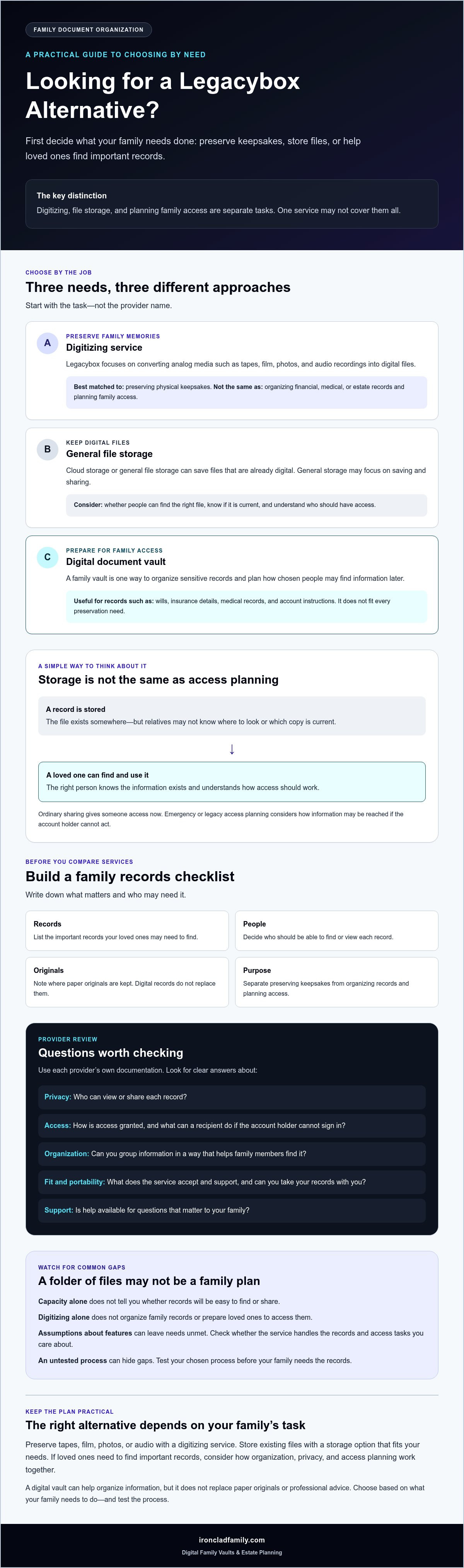
Start with the task, not the provider name. Are you trying to digitize paper records, preserve old photos and tapes, store files that are already digital, or prepare chosen people to find information later? These needs can overlap, but one service may not address them all.
Write down which records matter, who may need them, and when access could be needed. A relative helping with bills during an emergency may need different information from someone preserving family photos or handling estate matters. This list gives you a practical basis for comparing services without relying on an unverified ranking of named providers.
Why access planning matters as much as storage
A file can be safely stored and still be hard to use. Loved ones may not know it exists, recognize its purpose, or know how to reach it. Ordinary sharing gives someone access now; planned emergency or legacy access considers how information should be reached if the account holder cannot act. The topic is part of digital inheritance, which includes what happens to digital assets after a person dies.
Storage keeps a record; access planning helps the right person find and use it at the right time.
A digital document vault for families is one way to organize sensitive records and plan access. It isn’t right for every preservation need, and it doesn’t replace paper originals or professional advice. For an example, review this digital vault for family records and compare its documented features with your needs.
Common mistakes when comparing Legacybox alternatives and family vaults
Choosing a place to put files can feel like progress. But a folder full of scans may still leave loved ones unsure which file to open, whether it’s current, or who should be contacted for help. Digitizing records is one step. Making them useful to the people you trust takes a separate plan.
Mistaking file storage for a complete family plan
A folder labeled “Family” can hold a will, insurance papers, and account details without telling anyone which file to open first or who should be allowed to see it. Create an inventory of essential records and intended recipients. Note where originals are kept, too. A digital service can help organize information, but it doesn’t replace legal, financial, or personal advice.
Choosing by storage capacity alone
More space doesn’t necessarily make records easier to find or share. A digital document vault for families may offer ways to group information and plan access, while general file storage may focus on saving and sharing files. Compare how each option supports your actual tasks, not just how much it can hold.
Assuming every service handles every kind of record
Before signing up, check what the provider actually accepts and supports. Don’t assume it stores paper originals, helps prepare legal documents, or manages passwords and other credentials. Some services may only digitize selected physical media; others may store files you upload. Read the service description and ask about anything that matters to your family.
Overlooking privacy, access, and continuity
Review the provider’s own documentation before adding sensitive records. Look for clear answers to practical questions:
- Who can view or share each record, and how is access granted?
- What steps can a recipient take if the account holder can’t sign in?
- Can you export your files, and in what form?
- What happens to stored information if you stop using the service or the provider changes its service?
- What does the provider mean by “encrypted,” and can it access stored files?
Treat security claims as questions to verify, not guarantees. Test the process with a non-sensitive file to see whether a trusted person can locate it and understand the access steps before the records matter.
For a practical reference point, review the family document organization approach alongside your checklist, then compare its stated features with other options. Choose only what fits your records, privacy needs, and access plan.
Legacybox alternatives compared by the job your family needs done
There isn’t one replacement that suits every family. Some options create digital copies, while others store files, manage credentials, or help organize records for future access. Compare the task each category is built for, then confirm its current scope and terms with the provider.
| Solution category | Best-fit need | Questions to ask | Limitations to verify |
|---|---|---|---|
| Physical-document digitization or preservation | Creating digital copies of paper records or preserving physical keepsakes, depending on the service. | Which materials are accepted? How are originals handled? What file formats are provided? | Does the service cover the records you have? Does it store digital copies afterward, or only create them? |
| General cloud storage | Saving and arranging files that are already digital. | How do sharing, recovery, and file export work? What do the privacy terms say? | Storing files may not provide a clear system for family records or future access. |
| Password manager | Keeping sign-in details together, if its features fit your needs. | How can a trusted person access credentials? What account recovery steps apply? | Check whether it supports documents and broader family records, not just passwords. |
| Family digital vault | Organizing important records and planning access for chosen recipients. | How are records grouped? How are recipients selected? What privacy and emergency-access features are described? | Review export options, recovery steps, ongoing access terms, and how physical originals are handled separately. |
When digitization or file storage may fit
If you’re starting with paper records or old family media, a digitization service may help create digital copies. Confirm which items it accepts and what happens to originals. General cloud storage may suit files you already have, especially if you need a shared place to arrange them. Check the provider’s current privacy, sharing, export, and long-term access terms before uploading sensitive information.
When a family vault may fit
A family vault is designed to bring organized records and planned recipient access together. Compare its documented access options, privacy model, and ways to group records. Don’t assume every service supports the same documents or emergency arrangements.
These categories can complement one another, but they aren’t interchangeable by default. For example, a family may digitize keepsakes, use file storage for everyday documents, and choose a vault for records that need a clear access plan. IronClad Family’s Vault is one example of the family-vault category. Assess any provider against your family’s needs and verify its current features directly.
How to choose a Legacybox alternative: a practical family checklist
A clear checklist keeps the comparison focused on what your family needs, rather than on a feature list alone. Work through these steps before choosing a service:
- List your needs. Note whether you need to digitize paper, store existing files, organize credentials, manage estate documents, or share family instructions.
- Sort the records. Group what you have, then mark which records need to stay as physical originals or be stored somewhere else.
- Identify recipients. Decide who may need each type of information and in what situation. A person who helps with routine household tasks may not need access to every sensitive record.
- Compare services. Use the same questions for each provider and check its current documentation.
- Test the process. Try organizing, updating, sharing, and retrieving a non-sensitive item before depending on the service for important records.
Build a requirements list before comparing services
Make separate groups for paper records, digital files, credentials, estate documents, and family instructions. For each group, write down who may need it and when. A family member handling an urgent household matter may need different details from someone helping carry out your wishes. For more background, read this secure digital vault estate-planning guide.
Use consistent questions for every provider
Provider terms can change, so rely on current documentation and ask for clarification when needed. Check how encryption and sharing work, how recipients gain access, and what account recovery involves. Confirm whether you can update, download, or remove records, and what support is available if you get stuck. For a digital document vault for families, also check how information is organized and whether the access options match your family’s plan.
Decide what belongs in the service and what should remain elsewhere. A vault may help organize copies and instructions, but it doesn’t hold physical originals or replace personal, financial, or legal advice. Professionals supporting clients can use these questions to understand preferences and compare options without promising a legal result or a particular technical outcome.
Use this checklist for every provider: What can we store? Who can find it? How is access recovered? Can we update or export it? What happens if we leave?
For one example of a family document organization approach, review IronClad Family’s information and compare its documented details with your requirements.
How a digital document vault for families fits into a lasting plan
A family vault can help keep important records and instructions organized as life changes. It provides a digital place to arrange documents and plan access for chosen recipients. Unlike a service focused on converting physical media, a vault can help make records easier to locate and connect them to a family’s access plan.
A vault is one part of preparation, not the whole plan. It doesn’t replace legal or financial advice, and a digital copy may not replace a physical original. Decide which records belong in the vault, which need to remain elsewhere, and who should review them when details change.
What to look for in a family vault
Read the provider’s current information about encryption and who can access stored information. Check how documents are organized, how recipients are chosen, and what steps they follow to access records. If the service offers delivery of selected instructions or credentials, confirm what can be included and how delivery is triggered. Verify supported document types rather than assuming every record will fit.
Also consider how the family will keep information current. A useful plan identifies who is responsible for updates and tells recipients where to find guidance without sharing sensitive details too broadly.
A calm next step for family preparedness
Start with an inventory of essential records and the trusted people who may need them. Then decide what should be digitized, what should remain an original, and what access each person should have. A family vault may suit households that want organized records and planned recipient access; it may not be necessary if the main goal is simply preserving keepsakes.
The Vault is one example of this category. IronClad Family states that it uses zero-knowledge encryption and includes automated delivery features that release essential instructions and credentials to loved ones during emergencies or after a person’s passing. The platform also offers estate-planning tools, including state-specific wills and powers of attorney, along with remote online notary services. Review the current terms and access process before deciding whether these features match your family’s needs.
For more information about the service, visit the digital vault for family documents.
Make your family’s next step clear
The right choice fits your family’s needs and gives trusted people a clear path to the information they may need. Before deciding, review the provider’s current privacy, access, recovery, and export terms.
A digital document vault for families can support a thoughtful plan for important records. IronClad Family says The Vault uses zero-knowledge encryption and includes automated delivery features for selected instructions and credentials. Check the details against your family’s preferences before choosing.
Frequently Asked Questions
What is the difference between Legacybox and a digital document vault for families?
Legacybox digitizes analog media, while a digital document vault is designed to organize important family records and plan access. Legacybox handles items such as tapes, film, photos, and audio recordings, with digital copies delivered through available formats. A family vault focuses on records and access arrangements. These tools serve different purposes, so one may complement the other rather than replace it.
What should families compare when looking for Legacybox alternatives?
Compare options by the task you need done: digitizing paper or keepsakes, storing existing files, managing credentials, or preparing chosen people to find records. Check supported document types, privacy practices, sharing controls, account recovery, export options, and what happens if you stop using the service. Use each provider’s current documentation, and confirm details that affect your family’s plan before uploading sensitive information.
Is cloud storage enough to organize important family documents?
Cloud storage may be enough if your main need is saving and arranging files and you have a clear way to share and retrieve them. A folder alone may not tell relatives what a document is, whether it’s current, or who should access it. Add a simple inventory, label files clearly, and decide how trusted people can get access. Check the provider’s recovery and sharing terms.
Can a digital vault help loved ones find documents during an emergency?
It can help if records are organized and the service has access features that fit your plan. Before relying on one, learn how a trusted recipient is identified, what steps they must take, and which instructions or credentials may be shared. Test the process with a non-sensitive item. A vault can support preparation, but it can’t guarantee that every record will be available in every situation.
How do I choose a secure digital document vault for my family?
Start by listing the records you want to organize and who may need them. Then review the provider’s current information about encryption, access controls, account recovery, file export, and support. Ask what “secure” means in practice, including whether the provider can access stored information. A digital document vault for families should fit your privacy needs and be simple enough for intended recipients to use.
Can a family digital vault store passwords and emergency instructions?
It depends on the service, so check its current feature details rather than assuming it works like a password manager. Confirm whether it accepts passwords, other credentials, and written instructions, and how selected recipients may receive them. IronClad Family says its platform includes automated delivery features for selected instructions and credentials during emergencies or after a person’s passing. Verify which items and access steps apply.
Does a digital document vault replace a will or physical original documents?
No. A vault can help organize digital records and access instructions, but it doesn’t replace a will, legal or financial advice, or physical originals. Keep originals where appropriate and make sure trusted people know how to locate them. Treat digital copies as part of a broader preparation plan, and ask a qualified professional how to handle documents that have specific legal or financial importance.
